
Hermes: Cut Pod Ready Time from 4m35s to 14s, No Image Changes
 CloudPilot AIEngineering TeamPublishedMay 28, 2026Read4 min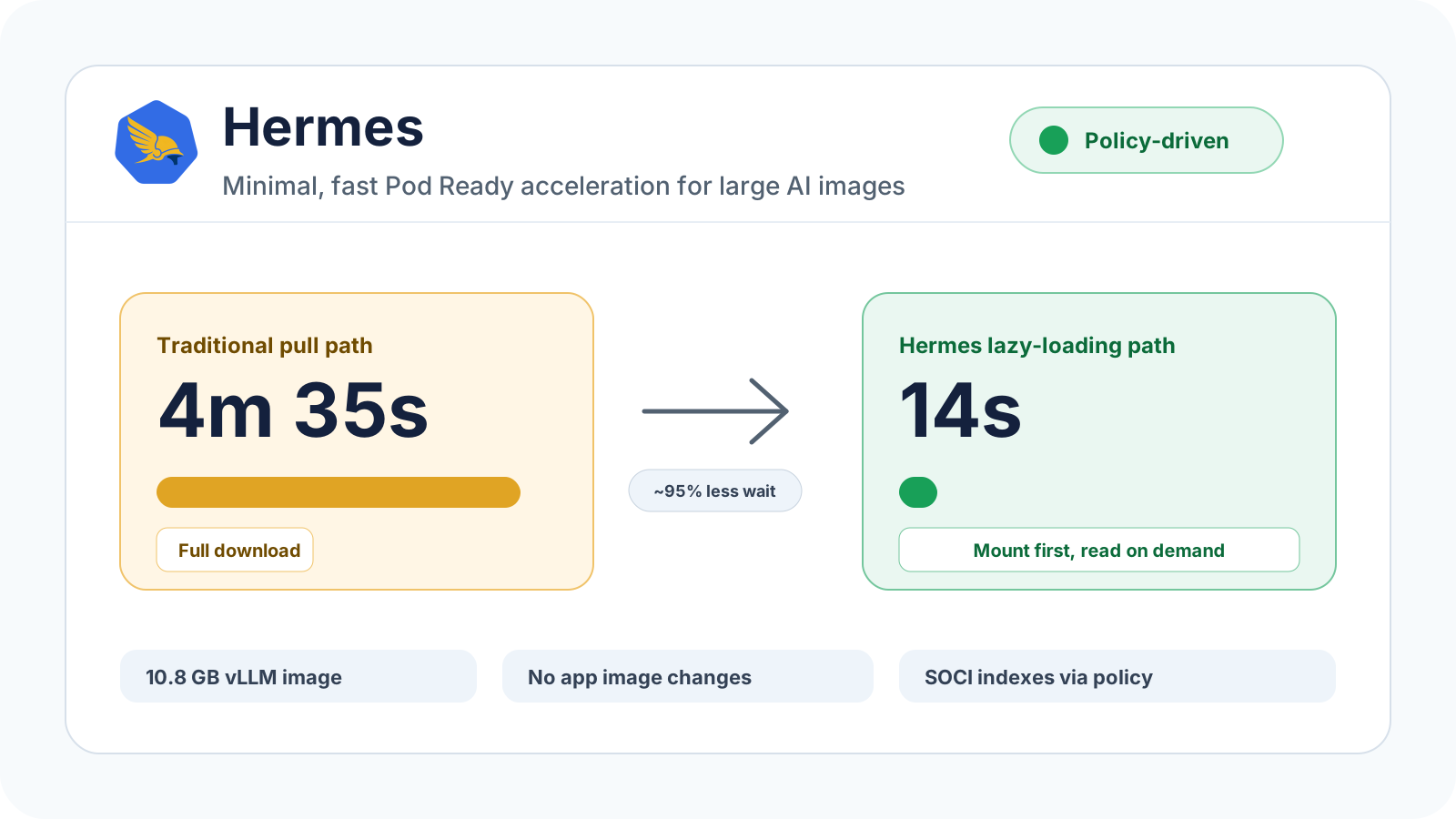
Background
When running AI inference services such as vLLM on Kubernetes, cold start time does not only come from model loading. Container images also matter. Inference images usually include PyTorch, CUDA, Python dependencies, and system libraries, so they can easily grow to several GB or even more than 10 GB. With the traditional containerd/overlayfs path, a node must fully download and unpack the image before the Pod can start. This slows down elastic scaling, GPU node cold starts, and the first-request experience.
Lazy loading splits this process apart: the image filesystem is mounted through an index first, the container starts earlier, and only the files that are actually accessed are read from the registry on demand. SOCI, eStargz, and Nydus have all proven the value of this direction, but production adoption often adds new complexity: building indexes, converting images, maintaining additional tags, changing CI/CD, or changing application image references.
Hermes - https://github.com/cloudpilot-ai/hermes aims to make this path extremely simple. Application teams continue publishing and using their original OCI images. They do not need to change Dockerfiles, rebuild images, update CI, or change image references. The platform team only defines a HermesPolicy; Hermes then automatically builds, caches, and serves SOCI indexes inside the cluster. The Hermes daemon on each node retrieves those indexes and continues lazy loading image data from the original registry.
In other words, Hermes turns lazy loading from an image workflow that application teams must adopt into a policy-driven Kubernetes cluster capability. Faster Pod Ready time does not automatically mean faster first-token latency, so Hermes validation should also track container startup, vLLM readiness, first-request TTFT, and real request latency after warmup.
The following experiment validates the lazy-loading effect with EKS, Karpenter, and Hermes.
Experiment Steps
Step 1: Create a Test EKS Cluster
You can quickly create a test cluster by downloading this example: https://github.com/cloudpilot-ai/examples/tree/main/clusters/eks-spot, then running:
terraform apply --auto-approve
Then fetch the kubeconfig:
export KUBECONFIG=~/.kube/eks
aws eks update-kubeconfig --name cluster-jw --region us-east-2
Step 2: Install Karpenter on EKS
Follow the official Karpenter documentation: Getting Started with Karpenter.
Step 3: Install the Hermes Controller and CRD
The Hermes daemon runs on each Hermes-enabled node. The controller and CRD must be deployed first so Hermes can watch HermesPolicy resources and Pods, then build, cache, and serve SOCI indexes.
git clone https://github.com/cloudpilot-ai/hermes.git
cd hermes

kubectl apply -f deploy/hermespolicy-crd.yaml
kubectl apply -f deploy/hermes-controller-eks.yaml

kubectl -n hermes-system rollout status deploy/hermes-controller
kubectl -n hermes-system get svc hermes-controller -o wide
By default, the Hermes controller exposes index/ztoc artifacts through NodePort. The hermes-daemon on the node accesses the controller through the local or node IP and the corresponding NodePort, then continues lazy loading image data from the original OCI registry.
Step 4: Configure Test NodePools and NodeClasses
Create two NodeClass/NodePool pairs: one with Hermes enabled and one without Hermes.
Configuration without Hermes. Remember to update the securityGroupSelectorTerms, subnetSelectorTerms, and role fields for your own cluster:
apiVersion: karpenter.k8s.aws/v1
kind: EC2NodeClass
metadata:
  name: non-hermes
spec:
  amiSelectorTerms:
  - alias: al2023@v20260423
  blockDeviceMappings:
  - deviceName: /dev/xvda
    ebs:
      encrypted: true
      volumeSize: 100Gi
      volumeType: gp3
  kubelet:
    evictionHard:
      memory.available: 10%
  metadataOptions:
    httpEndpoint: enabled
    httpProtocolIPv6: disabled
    httpPutResponseHopLimit: 2
    httpTokens: required
  role: CloudPilotNodeRole-cluster-jw
  securityGroupSelectorTerms:
  - tags:
      cluster.cloudpilot.ai/cluster-jw: "true"
  subnetSelectorTerms:
  - tags:
      cluster.cloudpilot.ai/cluster-jw: "true"
  tags:
    cloudpilot.ai/managed: "true"
---
apiVersion: karpenter.sh/v1
kind: NodePool
metadata:
  name: non-hermes
spec:
  disruption:
    budgets:
    - nodes: "2"
    consolidateAfter: 60m
    consolidationPolicy: WhenEmptyOrUnderutilized
  template:
    metadata:
      labels:
        node.cloudpilot.ai/managed: "true"
    spec:
      expireAfter: Never
      nodeClassRef:
        group: karpenter.k8s.aws
        kind: EC2NodeClass
        name: non-hermes
      requirements:
      - key: karpenter.k8s.aws/instance-gpu-count
        operator: DoesNotExist
      - key: karpenter.k8s.aws/instance-category
        operator: NotIn
        values:
        - a
        - t
      - key: kubernetes.io/arch
        operator: In
        values:
        - amd64
      - key: kubernetes.io/os
        operator: In
        values:
        - linux
      - key: karpenter.sh/capacity-type
        operator: In
        values:
        - on-demand
      - key: karpenter.k8s.aws/instance-memory
        operator: Lt
        values:
        - "32769"
      - key: karpenter.k8s.aws/instance-cpu
        operator: Lt
        values:
        - "17"
      - key: beta.kubernetes.io/instance-type
        operator: NotIn
        values:
        - c1.medium
        - m1.small
      - key: karpenter.k8s.aws/instance-family
        operator: In
        values:
        - c5a
  weight: 2
Configuration with Hermes enabled. Remember to update the securityGroupSelectorTerms, subnetSelectorTerms, and role fields for your own cluster:
apiVersion: karpenter.k8s.aws/v1
kind: EC2NodeClass
metadata:
  name: hermes
spec:
  amiSelectorTerms:
  - alias: al2023@v20260423
  blockDeviceMappings:
  - deviceName: /dev/xvda
    ebs:
      encrypted: true
      volumeSize: 100Gi
      volumeType: gp3
  kubelet:
    evictionHard:
      memory.available: 10%
  metadataOptions:
    httpEndpoint: enabled
    httpProtocolIPv6: disabled
    httpPutResponseHopLimit: 2
    httpTokens: required
  role: CloudPilotNodeRole-cluster-jw
  securityGroupSelectorTerms:
  - tags:
      cluster.cloudpilot.ai/cluster-jw: "true"
  subnetSelectorTerms:
  - tags:
      cluster.cloudpilot.ai/cluster-jw: "true"
  tags:
    cloudpilot.ai/managed: "true"
  userData: |-
    #!/bin/bash
    set -euxo pipefail

    export HERMES_INSTALLER_URL="https://raw.githubusercontent.com/cloudpilot-ai/hermes/main/hack/eks/install-hermes-daemon.sh"
    export HERMES_DAEMON_URL="https://github.com/cloudpilot-ai/hermes/releases/download/v0.0.1-alpha.1/hermes-daemon-linux-amd64.tar.gz"
    export HERMES_DAEMON_SHA256="93ea8d73e1c8b5324c8ee8ba9b4a5f50d686d60ba8453547460987d7d54ba861"

    curl -fsSL "${HERMES_INSTALLER_URL}" | \
        HERMES_DAEMON_URL="${HERMES_DAEMON_URL}" \
        HERMES_DAEMON_SHA256="${HERMES_DAEMON_SHA256}" \
        bash -s --
---
apiVersion: karpenter.sh/v1
kind: NodePool
metadata:
  name: hermes
spec:
  disruption:
    budgets:
    - nodes: "2"
    consolidateAfter: 60m
    consolidationPolicy: WhenEmptyOrUnderutilized
  template:
    metadata:
      labels:
        node.cloudpilot.ai/managed: "true"
    spec:
      expireAfter: Never
      nodeClassRef:
        group: karpenter.k8s.aws
        kind: EC2NodeClass
        name: hermes
      requirements:
      - key: karpenter.k8s.aws/instance-gpu-count
        operator: DoesNotExist
      - key: karpenter.k8s.aws/instance-category
        operator: NotIn
        values:
        - a
        - t
      - key: kubernetes.io/arch
        operator: In
        values:
        - amd64
      - key: kubernetes.io/os
        operator: In
        values:
        - linux
      - key: karpenter.sh/capacity-type
        operator: In
        values:
        - on-demand
      - key: karpenter.k8s.aws/instance-memory
        operator: Lt
        values:
        - "32769"
      - key: karpenter.k8s.aws/instance-cpu
        operator: Lt
        values:
        - "17"
      - key: beta.kubernetes.io/instance-type
        operator: NotIn
        values:
        - c1.medium
        - m1.small
      - key: karpenter.k8s.aws/instance-family
        operator: In
        values:
        - c5a
  weight: 2
Verify that the configuration is ready:
$ kubectl get nodepool -A
NAME                 NODECLASS    NODES   READY   AGE
hermes               hermes       1       True    11h
non-hermes           non-hermes   1       True    11h
Create a Secret so Hermes can pull the image:
export NAMESPACE=default
export ECR_REGION=us-east-1
export ECR_REGISTRY=763104351884.dkr.ecr.us-east-1.amazonaws.com
export SECRET_NAME=hermes-ecr-us-east-1

kubectl -n "$NAMESPACE" create secret docker-registry "$SECRET_NAME" \
  --docker-server="$ECR_REGISTRY" \
  --docker-username=AWS \
  --docker-password="$(aws ecr get-login-password --region "$ECR_REGION")" \
  --dry-run=client -o yaml | kubectl apply -f -
Finally, deploy the following workload YAML. This workload will be used for the test:
apiVersion: apps/v1
kind: Deployment
metadata:
  name: hermes-vllm-workload
  namespace: default
  labels:
    app: hermes-vllm-workload
spec:
  replicas: 0
  selector:
    matchLabels:
      app: hermes-vllm-workload
  template:
    metadata:
      labels:
        app: hermes-vllm-workload
        hermes.cloudpilot.ai/test: vllm
    spec:
      imagePullSecrets:
        - name: hermes-ecr-us-east-1
      nodeSelector:
        karpenter.sh/nodepool: non-hermes
      containers:
        - name: vllm
          image: 763104351884.dkr.ecr.us-east-1.amazonaws.com/vllm:0.9-gpu-py312-ec2
          imagePullPolicy: Always
          command:
            - sh
            - -lc
            - sleep 3600
          resources:
            requests:
              cpu: 4
Step 5: Test Without Lazy Loading
To avoid image cache effects, make sure the target NodePool does not reuse an old node before each test. One simple option is to delete the corresponding NodeClaim and let Karpenter create a fresh node. The timing below starts only after the Pod has been scheduled onto a node; it does not include the time Karpenter spends creating the EC2 node.
kubectl delete nodeclaim -l karpenter.sh/nodepool=non-hermes
Run the following commands:
kubectl -n default patch deployment hermes-vllm-workload --type='merge' -p '{"spec":{"template":{"spec":{"nodeSelector":{"karpenter.sh/nodepool":"non-hermes"}}}}}'
kubectl scale deploy/hermes-vllm-workload --replicas=1
Observe the Pod Ready time:
$ kubectl get pod -owide -w
NAME                                    READY   STATUS    RESTARTS   AGE   IP       NODE     NOMINATED NODE   READINESS GATES
hermes-vllm-workload-784449c98d-bkpj8   0/1     Pending   0          9s    <none>   <none>   <none>           <none>
hermes-vllm-workload-784449c98d-bkpj8   0/1     Pending   0          20s   <none>   <none>   <none>           <none>
hermes-vllm-workload-784449c98d-bkpj8   0/1     Pending   0          29s   <none>   ip-10-0-3-237.us-east-2.compute.internal   <none>           <none>
hermes-vllm-workload-784449c98d-bkpj8   0/1     ContainerCreating   0          29s   <none>   ip-10-0-3-237.us-east-2.compute.internal   <none>           <none>
hermes-vllm-workload-784449c98d-bkpj8   0/1     ContainerCreating   0          4m39s   <none>   ip-10-0-3-237.us-east-2.compute.internal   <none>           <none>
hermes-vllm-workload-784449c98d-bkpj8   1/1     Running             0          5m4s    10.0.11.32   ip-10-0-3-237.us-east-2.compute.internal   <none>           <none>

$ kubectl get nodeclaim -A
NAME                       TYPE          CAPACITY    ZONE         NODE                                       READY   AGE
non-hermes-ls7hq           c5a.2xlarge   on-demand   us-east-2a   ip-10-0-3-237.us-east-2.compute.internal   True    5m9s
From successful scheduling to Ready, the image pull path took about 5m4s - 29s = 4m35s.
Step 6: Test the Hermes Lazy-Loading Path
After the previous test finishes, deploy the following HermesPolicy so the controller can build a SOCI index for matching images. Note that the 14s result below assumes the HermesPolicy is already Ready; it does not include the first index build time.
apiVersion: hermes.cloudpilot.ai/v1alpha1
kind: HermesPolicy
metadata:
  name: prod-large-images
spec:
  paused: false
  imageSelectors:
    - imageRegex: ".*vllm.*"
    - imageRegex: ".*nginx.*"
  platforms:
    - linux/amd64
Watch the CR until its status shows phase: Ready:
$ kubectl get hermespolicy -oyaml
apiVersion: v1
items:
- apiVersion: hermes.cloudpilot.ai/v1alpha1
  kind: HermesPolicy
  metadata:
    annotations:
      kubectl.kubernetes.io/last-applied-configuration: |
        {"apiVersion":"hermes.cloudpilot.ai/v1alpha1","kind":"HermesPolicy","metadata":{"annotations":{},"name":"prod-large-images"},"spec":{"imageSelectors":[{"imageRegex":".*vllm.*"},{"imageRegex":".*nginx.*"}],"paused":false,"platforms":["linux/amd64"]}}
    creationTimestamp: "2026-05-27T15:13:46Z"
    generation: 1
    name: prod-large-images
    resourceVersion: "243525"
    uid: efa35cb4-2911-4b33-94a1-3408b7d84fd1
  spec:
    imageSelectors:
    - imageRegex: .*vllm.*
    - imageRegex: .*nginx.*
    paused: false
    platforms:
    - linux/amd64
  status:
    images:
    - imageDigestRef: 763104351884.dkr.ecr.us-east-1.amazonaws.com/vllm@sha256:7ca69228a9066855929a9260bed4f8f076f3433f57fc0c05cc1ae425fd19d2b9
      lastBuildTime: "2026-05-28T02:51:11Z"
      phase: Ready
      platform: linux/amd64
    observedGeneration: 1
    ready: 1
kind: List
metadata:
  resourceVersion: ""
Ready means the SOCI artifact has already been built and cached. Later Pod starts can use Hermes lazy loading.
Then run:
kubectl scale deploy/hermes-vllm-workload --replicas=0
kubectl -n default patch deployment hermes-vllm-workload --type='merge' -p '{"spec":{"template":{"spec":{"nodeSelector":{"karpenter.sh/nodepool":"hermes"}}}}}'
Again, to avoid reusing local image cache on a Hermes node, make sure the test Pod has been deleted and the Hermes NodePool uses a fresh NodeClaim before the timed run:
kubectl wait --for=delete pod -l app=hermes-vllm-workload -n default --timeout=180s || true
kubectl delete nodeclaim -l karpenter.sh/nodepool=hermes
kubectl scale deploy/hermes-vllm-workload --replicas=1
Observe the Pod Ready time:
$ kubectl get pod -owide -w
NAME                                    READY   STATUS    RESTARTS   AGE   IP       NODE     NOMINATED NODE   READINESS GATES
hermes-vllm-workload-544dfbcc66-nwd2h   0/1     Pending   0          9s    <none>   <none>   <none>           <none>
hermes-vllm-workload-544dfbcc66-nwd2h   0/1     Pending   0          21s   <none>   <none>   <none>           <none>
hermes-vllm-workload-544dfbcc66-nwd2h   0/1     Pending   0          30s   <none>   ip-10-0-2-194.us-east-2.compute.internal   <none>           <none>
hermes-vllm-workload-544dfbcc66-nwd2h   0/1     ContainerCreating   0          30s   <none>   ip-10-0-2-194.us-east-2.compute.internal   <none>           <none>
hermes-vllm-workload-544dfbcc66-nwd2h   1/1     Running             0          44s   10.0.12.224   ip-10-0-2-194.us-east-2.compute.internal   <none>           <none>

$ kubectl get nodeclaim -A
NAME                       TYPE          CAPACITY    ZONE         NODE                                       READY   AGE
hermes-t4mk2               c5a.2xlarge   on-demand   us-east-2a   ip-10-0-2-194.us-east-2.compute.internal   True    56s
From successful scheduling to Ready, the lazy-loading path took about 44s - 30s = 14s.
Summary
In this test, after HermesPolicy had already built the SOCI index for the image, Hermes reduced the time from Pod scheduled-on-node to container Running/Ready for the 10.8 GB image 763104351884.dkr.ecr.us-east-1.amazonaws.com/vllm:0.9-gpu-py312-ec2 from 4m35s to 14s. The improvement is significant.
This result measures the image pull/mount-to-container-start path. It does not include the first index build time, and it does not represent vLLM first-token latency. Hermes validation should continue with vLLM readiness, first-request TTFT, and real request latency after warmup. We will test that end to end later.
Follow the project here: https://github.com/cloudpilot-ai/hermes.
Related articles
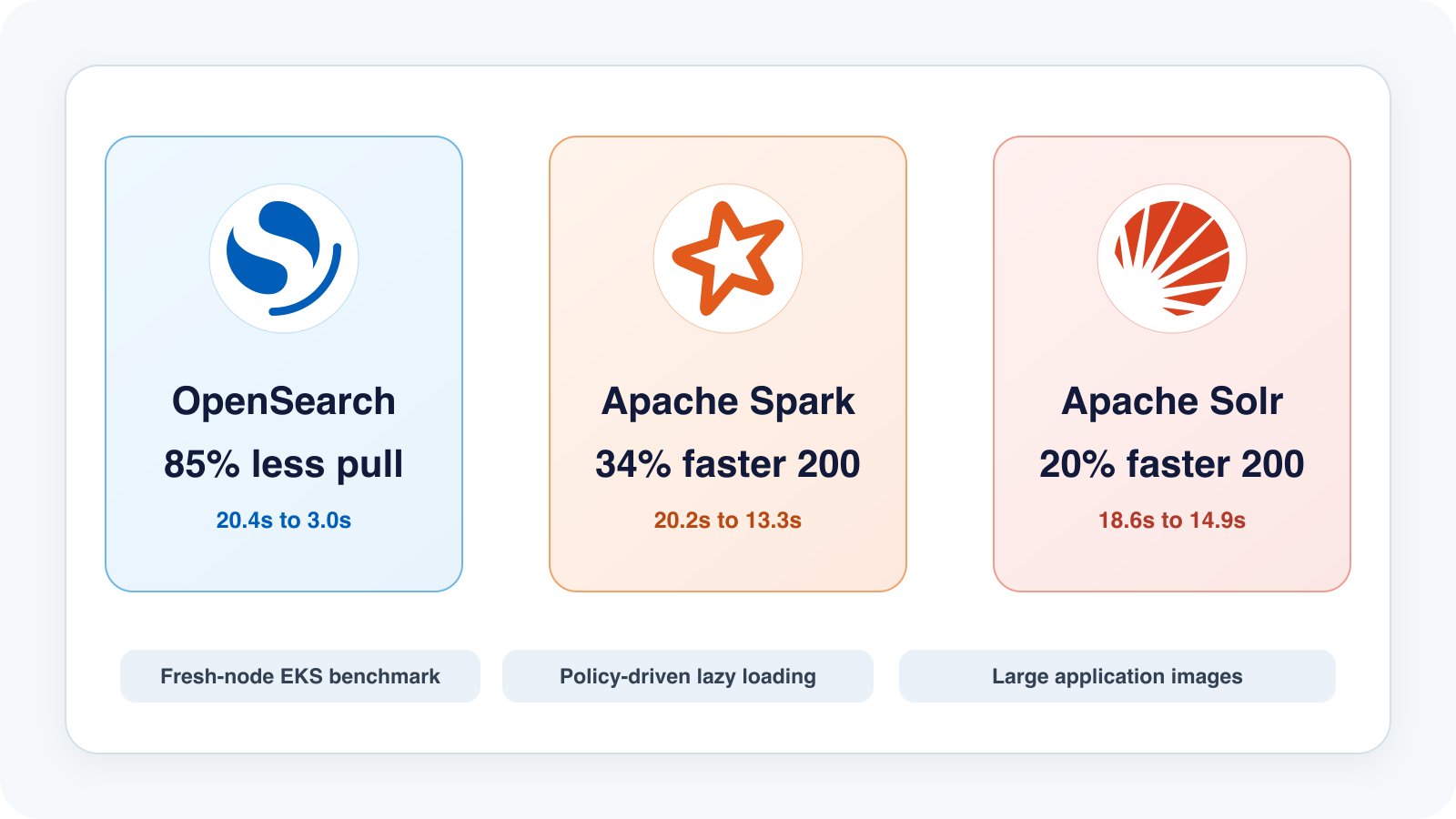
Hermes EKS Benchmark: 85% Faster Image Pull and 34% Faster First HTTP 200, No Image Rebuilds
EKS benchmark results for Hermes on OpenSearch, Solr, and Spark: image pull was 71-85% faster, and first HTTP 200 improved by up to 34%, using the original OCI images.
CloudPilot AI·6 min
CloudPilot AI Is Now Available on Microsoft Azure Marketplace
AKS teams can now subscribe to CloudPilot AI on Microsoft Azure Marketplace with the Azure billing account they already use: one Azure invoice, usage-based pricing, and no separate contract to negotiate.
CloudPilot AI·3 min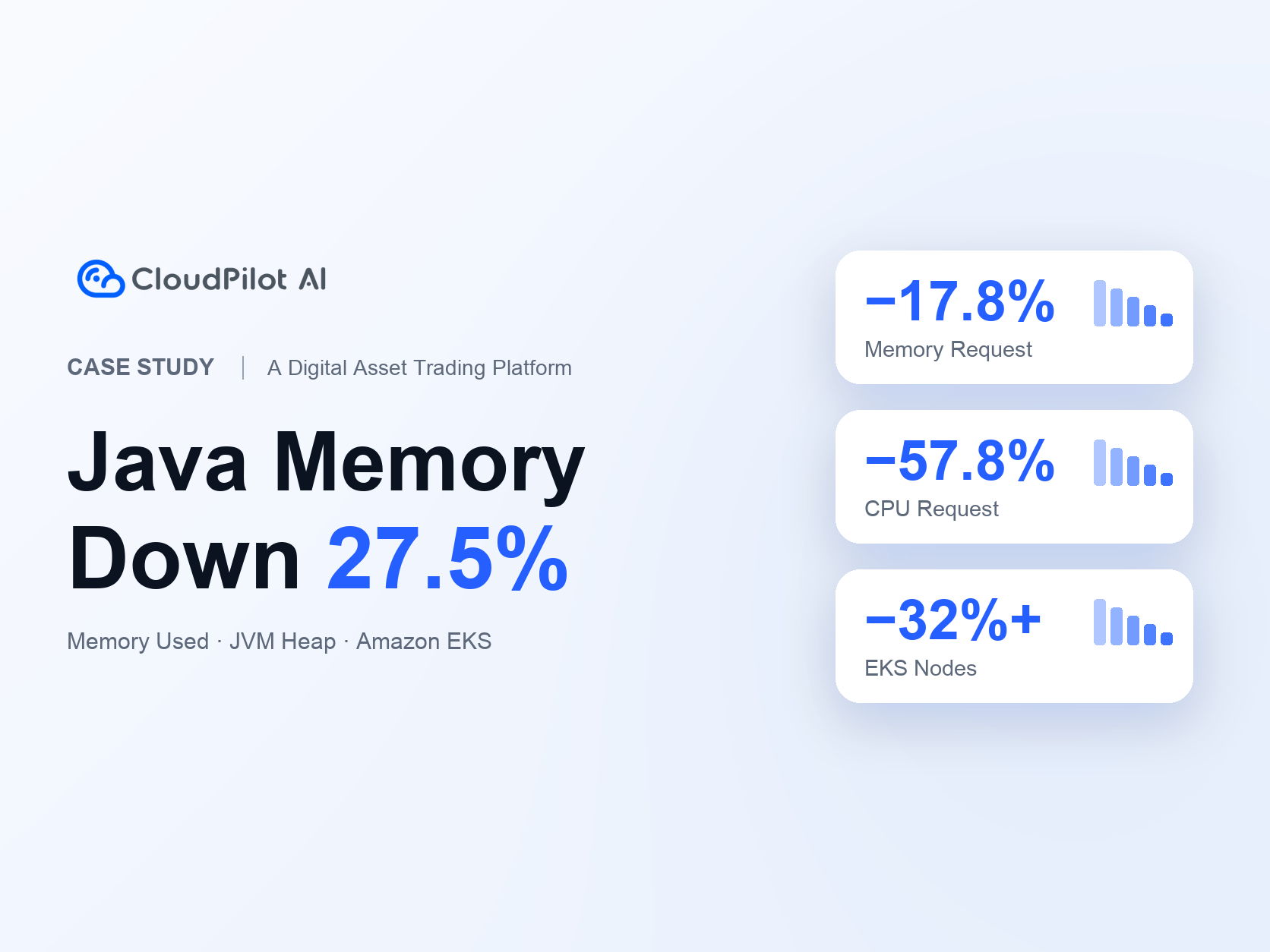
A Digital Asset Trading Platform Optimizes Java Services: Memory Usage Down 27.5%, EKS Nodes Down 32%+
A digital asset trading platform uses CloudPilot AI to align Java memory and Kubernetes resource requests with application demand, reducing Java Memory Used by 27.5%, Java Memory Request by 17.8%, CPU Request by 57.8%, and EKS node count by 32%+ alongside its existing Karpenter setup.
CloudPilot AI·8 minThe Kubernetes Autoscaling Brief
Once a month: what we see in the Spot market, one real cluster torn down, and what shipped.
No spam. Unsubscribe anytime.