
CPU Usage Looks Low. Why Is Your Application Still Slow?
 CloudPilot AIEngineering TeamPublishedOct 30, 2026Read7 min
How CloudPilot AI Workload Autoscaler combines usage and resource pressure to make better recommendations.
The order page is fast one moment and slow the next. The team opens its dashboards, but CPU usage remains low. Reducing requests further raises concerns about timeouts and complaints. Adding resources leaves the team unsure whether it is addressing the right problem. Resource optimization gets stuck between “there still seems to be room to save” and “nobody wants to touch it.”
PSI, or Pressure Stall Information, measures the proportion of time tasks are stalled while waiting for resources. Usage tells us how much resource was consumed; PSI adds how much time tasks spent waiting for it.
CloudPilot AI Workload Autoscaler brings usage, historical runtime behavior, and resource policies together in its recommendations, helping teams distinguish genuine excess capacity from hidden pressure.
The examples below illustrate how resource recommendations respond to usage and pressure. All figures are illustrative, not measured customer results.
Scenario One: CPU Usage Is Low, but Order Queries Keep Slowing Down
Consider an example SaaS order service and how PSI helps the team find a more appropriate resource configuration.
The query service shares nodes with background tasks such as report exports and asynchronous notifications. Page refreshes are usually fast. During query peaks, operations staff repeatedly switch order filters, and the slowest requests start taking almost a second. CPU usage is around 300m, the original template CPU request is 1000m, the current Pod request is 400m, and the subsequent recommendation is 720m. The usage curve does not show a similarly pronounced peak.
Looking only at usage and the current request, the team could easily rule out resource configuration and continue investigating code, databases, or caches. In this scenario, however, runnable query tasks are competing with background tasks for CPU: CPU PSI is 6.4%, while P99 API latency measured in one-minute windows reaches 850ms. The usage curve does not show the time tasks spend waiting to obtain CPU.
CloudPilot AI Workload Autoscaler combines usage history, sustained pressure, and resource policies to recommend a CPU request of 720m for the query service. After optimization, the current request increases from 400m to 720m, up 80%. A higher CPU request can increase relative scheduling weight under CPU contention; the actual effect still needs to be assessed alongside CPU limits, node capacity, and application latency.
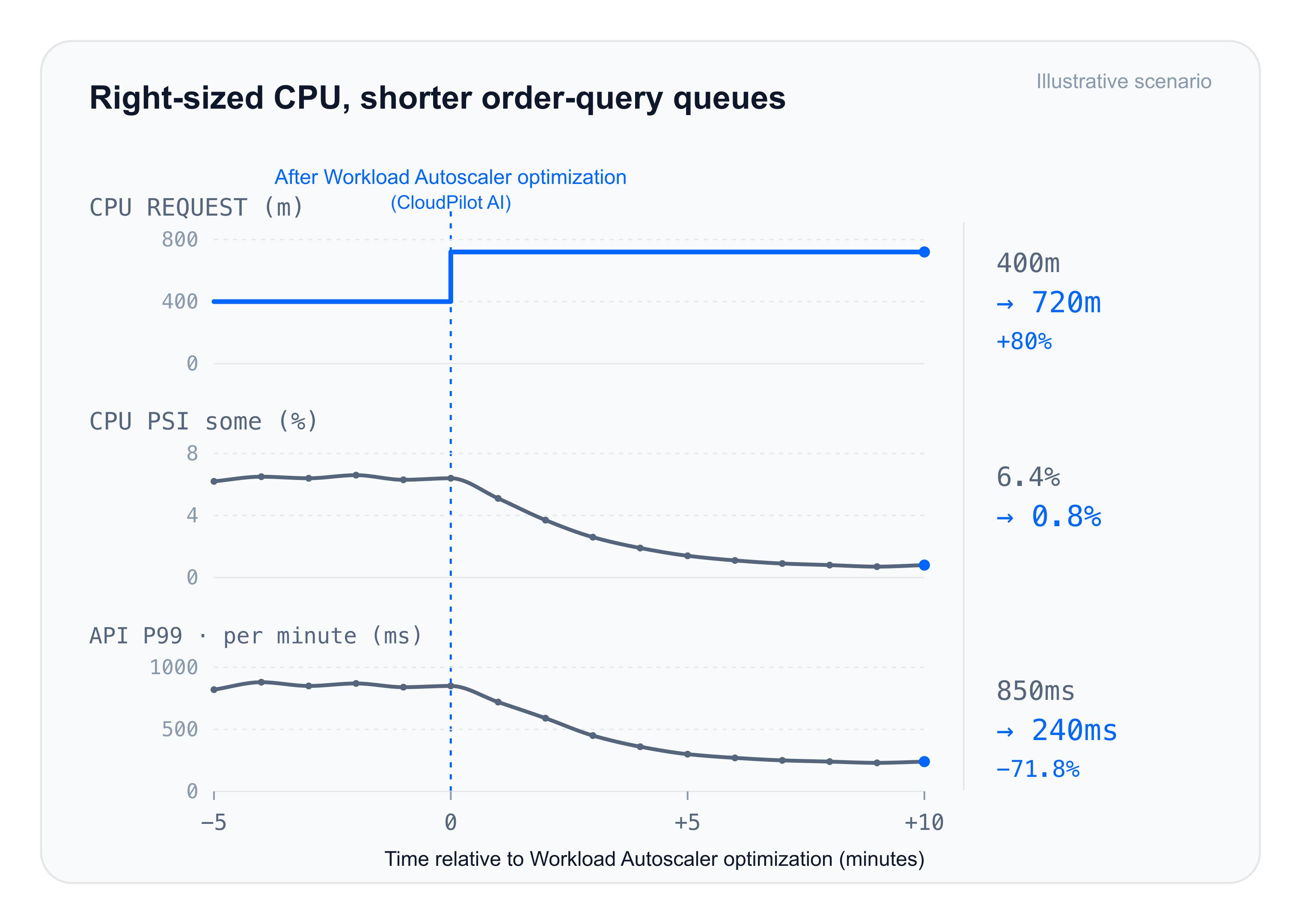
In this illustrative scenario, increasing the CPU request from 400m to 720m reduces CPU PSI from 6.4% to 0.8% and P99 API latency from 850ms to 240ms, a reduction of approximately 71.8%. For people using the page, the slowest requests no longer hold up interactions when they change filters or refresh the order list. The page feels noticeably more responsive.
From “How Much Was Used?” to “Were Resources Available in Time?”
Two services using around 250m (0.25 cores) of CPU can be in very different situations. One runs on a node with ample resources, so tasks execute as soon as they arrive. The other shares a node with batch processing and often has tasks waiting in a queue. Adding the same buffer to both leaves more reservations for the first service without clearly identifying the pressure that needs attention in the second.
CloudPilot AI Workload Autoscaler brings different information into one recommendation pipeline:
- Historical usage: Understand the distribution and fluctuations of resource consumption instead of treating a momentary low point as the full picture of demand.
- PSI: Add resource waiting time, using sustained pressure and affected replicas to identify conditions that average usage can hide.
- Resource policies: Apply configuration ranges, buffers, and other constraints to produce actionable recommendations.
See the RecommendationPolicy documentation for configuration options and PSI recommendation protection.
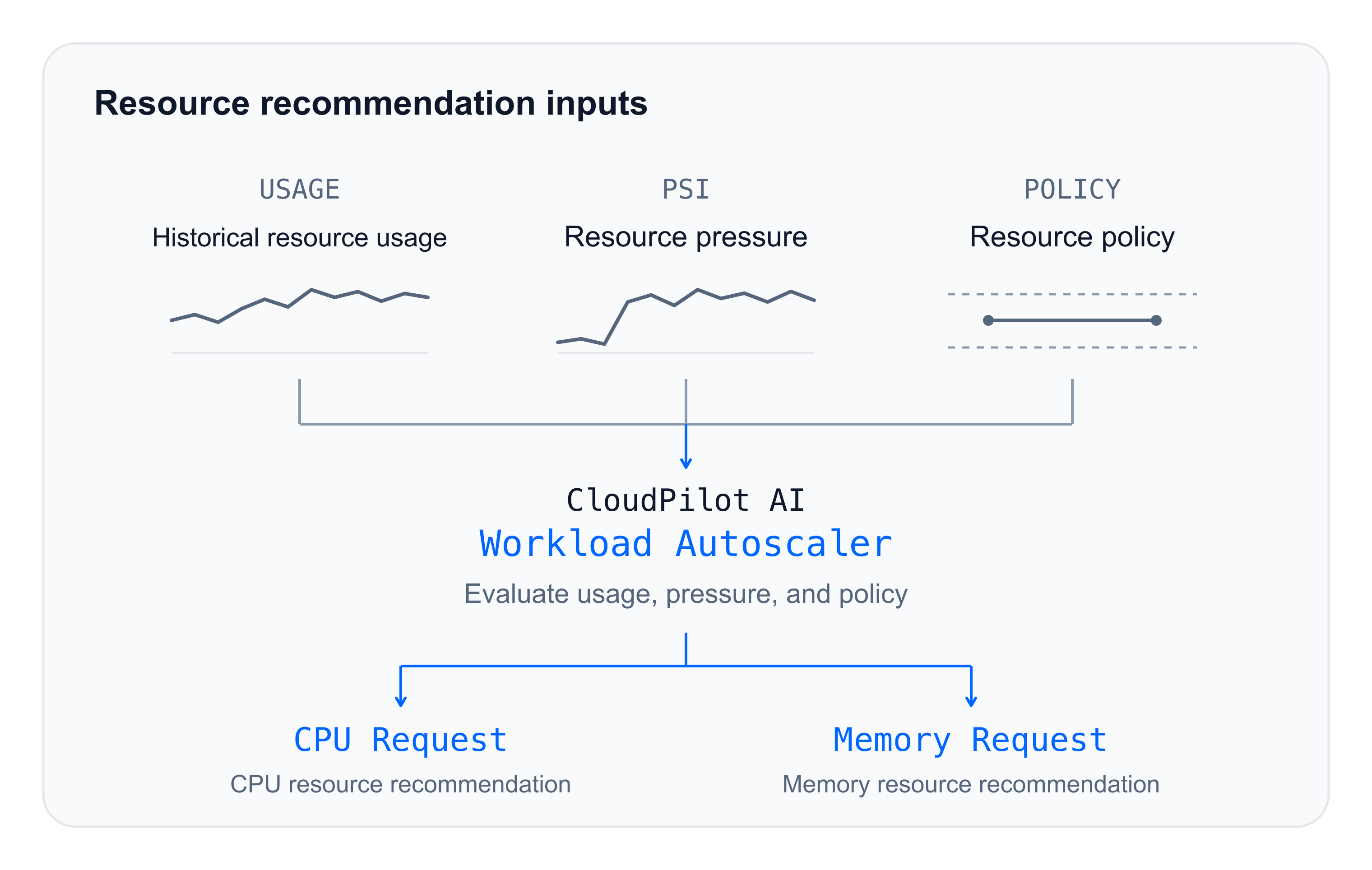
In this example, services with the same 300m usage baseline receive a 300m recommendation under low pressure and a 720m recommendation under sustained pressure. Better recommendations align resource configuration with how the workload is running.
Scenario Two: Resources Are Overprovisioned, but the Team Is Afraid to Downsize
Another difficulty appears at the cluster level. The team sees many services with persistently low usage, while a few critical services are already waiting for resources. Concerned that a blanket reduction will make matters worse, it puts downsizing on hold. Existing excess reservations remain in place.
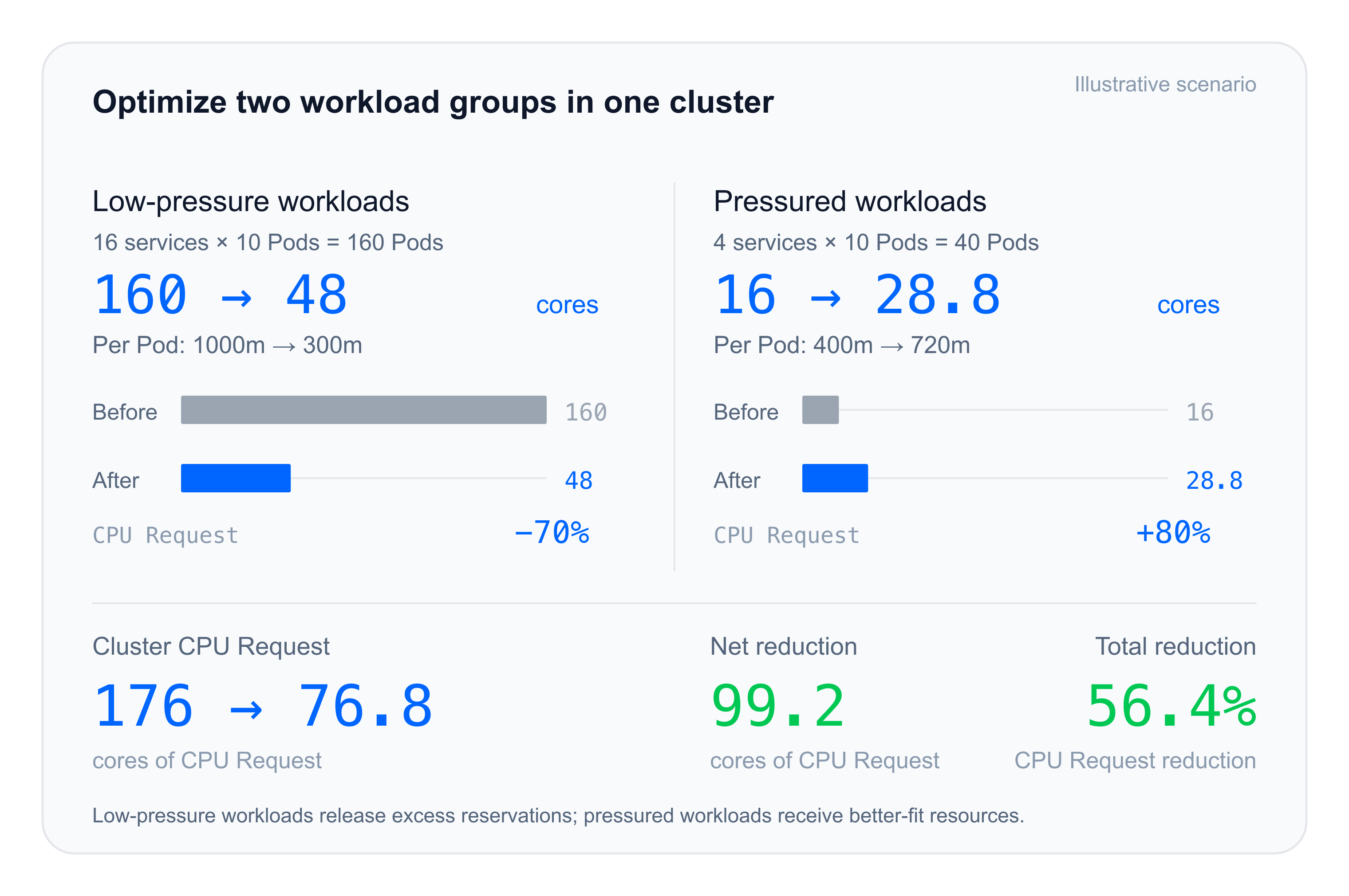
Extend the earlier scenario to 20 services, each running 10 single-container Pods. The 16 low-pressure services, totaling 160 Pods, currently request 1000m per Pod. The 4 services under pressure, totaling 40 Pods, currently request 400m per Pod. Replica counts stay unchanged, with recommendations of 300m and 720m, respectively.
| Workload Group | CPU Request Before | CPU Request After |
|---|---|---|
| 16 low-pressure services · 160 Pods | 160 cores | 48 cores |
| 4 services under pressure · 40 Pods | 16 cores | 28.8 cores |
| Total | 176 cores | 76.8 cores |
Total cluster CPU requests decrease by 56.4%, while CPU requests for workloads under pressure increase by 80%. Optimization no longer means reducing requests by the same percentage across all services. Low-pressure services release excess reservations, services under pressure receive different recommendations, and the team can more clearly explain the basis for each type of adjustment.
CloudPilot AI Workload Autoscaler optimizes workload resource requests, and CloudPilot AI Node Autoscaler then uses them to consolidate Pods and reclaim idle nodes. Coordinated optimization from workloads to nodes turns released resources into higher cluster efficiency and lower cloud costs.
Memory Also Needs Its Own Assessment
Memory optimization also requires understanding both usage and waiting. CloudPilot AI Workload Autoscaler includes Memory PSI alongside memory usage history in its recommendations. CPU and memory are assessed separately so that each configuration matches its own runtime conditions.
For example, when only CPU is under pressure, the CPU recommendation changes from 300m to 720m, while memory stays at 1.2Gi. When only memory is under pressure, CPU stays at 300m, and the memory recommendation is 1.8Gi.
Technical Notes: Understanding the Signals
PSI exposes two stall metrics: some and full. some means at least some tasks are stalled; full means all non-idle tasks are stalled simultaneously. For example, 5 seconds of CPU waiting within a 100-second interval corresponds to 5% CPU PSI.
Usage, the current request, and the new recommendation represent actual consumption, current configuration, and a configuration suggestion based on the combined runtime state, respectively. In the example, the optimized Pod's current request is 400m, while the original template configuration is 1000m. CPU requests express resource demand for scheduling and influence relative weight under contention; CPU limits define the CPU usage quota.
Workload Autoscaler associates pressure samples with the workload, checks that the samples are recent and valid, and combines them with historical usage and resource policies to generate recommendations. After an adjustment, the team can continue observing runtime behavior through PSI and application latency.
About CloudPilot AI
CloudPilot AI is a cloud infrastructure company based in San Francisco, specializing in autonomous Kubernetes optimization for enterprises operating at scale.
Its mission: Autoscaling Kubernetes for the most demanding teams.
The platform continuously right-sizes workloads, scales node capacity, accelerates container image delivery, automates workload placement, and enables high-performance local storage for I/O-intensive applications. Together, these capabilities help SRE and platform teams reduce cloud costs, improve application performance, and maintain reliability across multi-cloud environments—without manual tuning.
Related articles
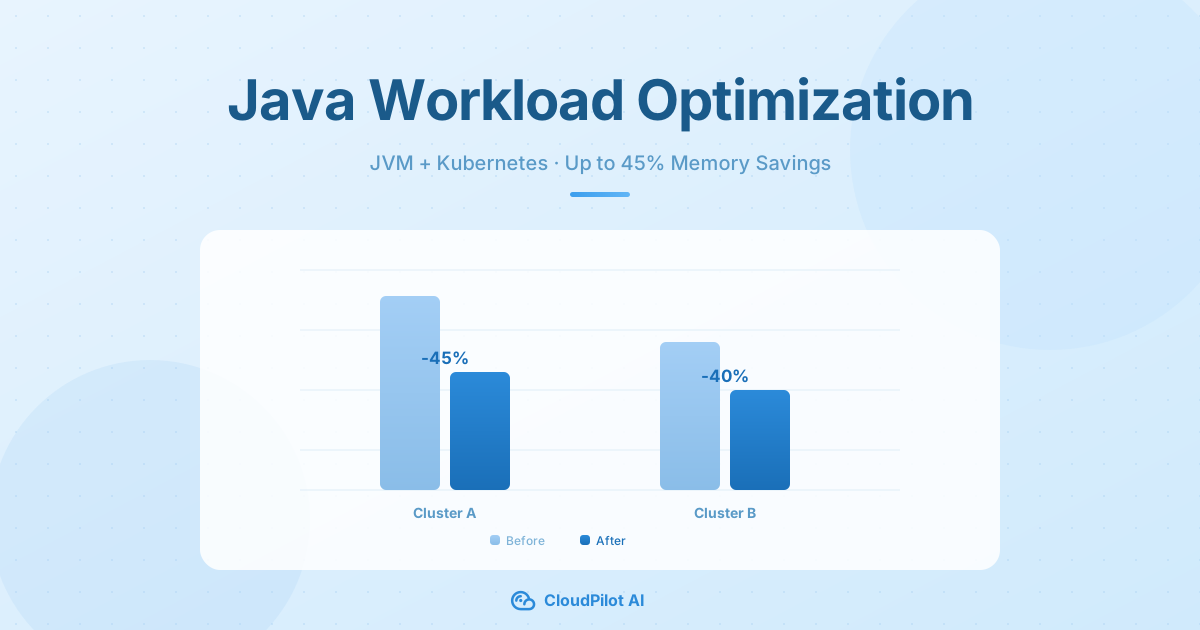
Up to 45% Less Memory, Zero Compromise: Smart Java Workload Optimization on Kubernetes
Learn how CloudPilot AI jointly optimizes JVM Heap and Kubernetes container resources to cut Java workload memory by 40–45%—without sacrificing stability or requiring manual tuning.
CloudPilot AIMar 20, 20268 min
Kubernetes Capacity Planning Playbook: How to Balance Performance, Stability, and Cost
Learn how to plan, optimize, and automate Kubernetes capacity. This playbook covers best practices to balance performance, stability, and cloud cost.
CloudPilot AIOct 16, 20259 min
Master K8s VPA: 7 Pain Points and 8 Best Practices in the Real World
Adopting VPA is not without challenges. This article highlights common pain points and actionable best practices for using VPA effectively.
CloudPilot AIOct 1, 20254 minThe Kubernetes Autoscaling Brief
Once a month: what we see in the Spot market, one real cluster torn down, and what shipped.
No spam. Unsubscribe anytime.