
Memory Extension in Practice: Reducing OOM Risk During Memory Spikes
 CloudPilot AIEngineering TeamPublishedNov 4, 2026Read10 min

Traffic peaks and batch jobs can cause a sudden jump in an application's memory use. Memory that is sufficient during normal operation may run out during a spike, triggering an out-of-memory (OOM) kill, a container restart, and failed requests.
CloudPilot AI Memory Extension uses a compressed zswap cache and disk swap to add a buffer for these short bursts. We tested it on EKS with the feature enabled and disabled to see whether it could prevent OOM kills and how it affected request latency.
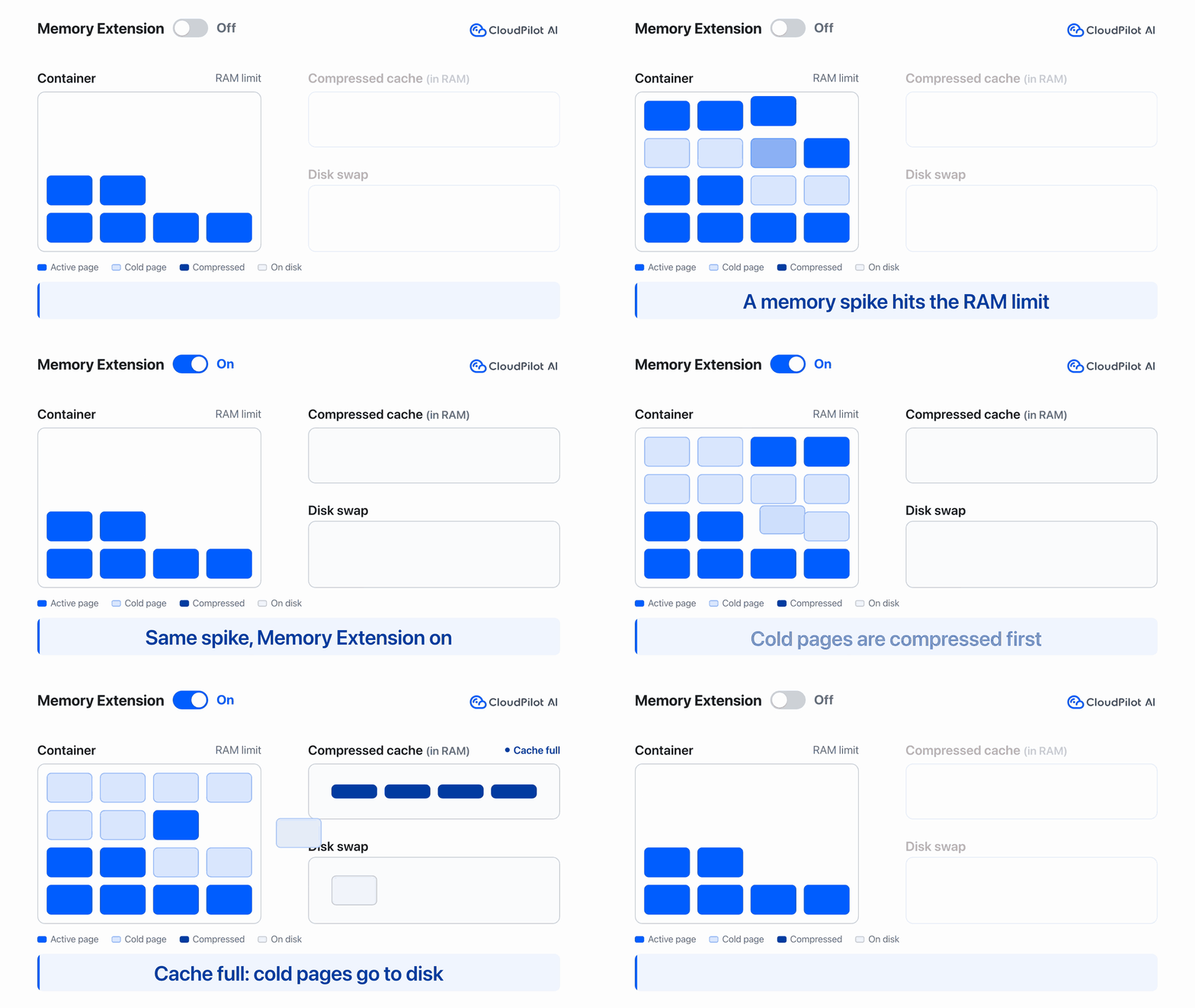
The same memory spike, no OOM kills in three runs
Both groups had a container RAM limit of 1 GiB. The group with Memory Extension disabled had no swap allowance; the enabled group could use up to 512 MiB of swap.
The test application started with 256 MiB of data. After 30 seconds, it attempted to grow to 1,152 MiB, write the data, hold it for 60 seconds, and then release it. The data was compressible and accessed infrequently, so the amount of data held was not the same as its physical RAM footprint.
We ran each group three times. With Memory Extension disabled, all three runs hit OOM. With it enabled, all three completed allocation, hold, and release without OOM.
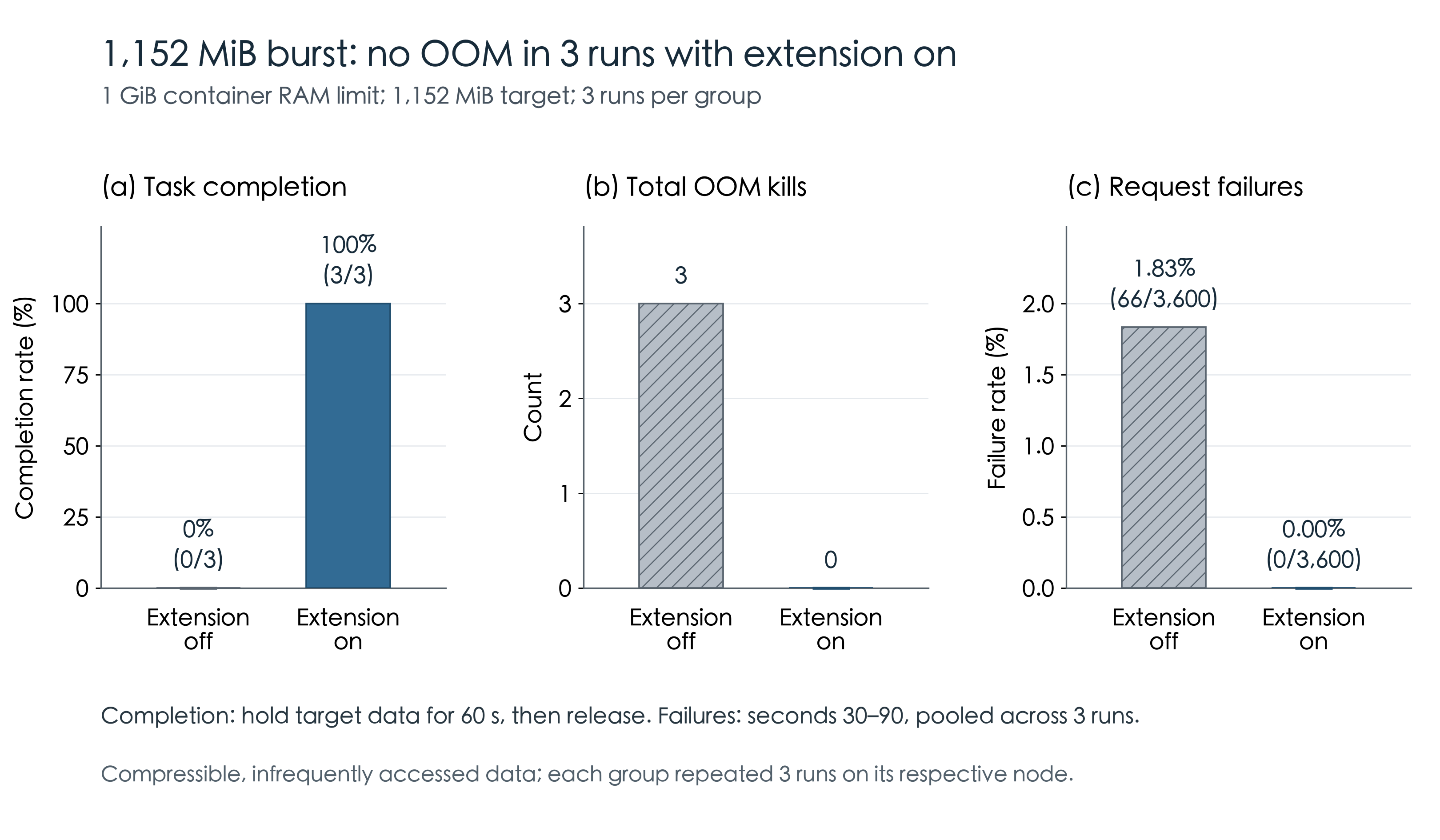
During seconds 30–90, the disabled group had 66 failed requests out of 3,600; the enabled group had none out of 3,600. After the data was released, latency in the enabled group recovered.
Which workloads are good candidates?
Pages moved to swap can stay there if they are rarely accessed, freeing RAM for new allocations. If the application soon needs those pages again, reading them back adds latency.
CloudPilot AI's Cold Memory monitoring estimates the share of memory accessed infrequently. It helps identify workloads to try first. The final decision still depends on latency and request failures during a memory spike.
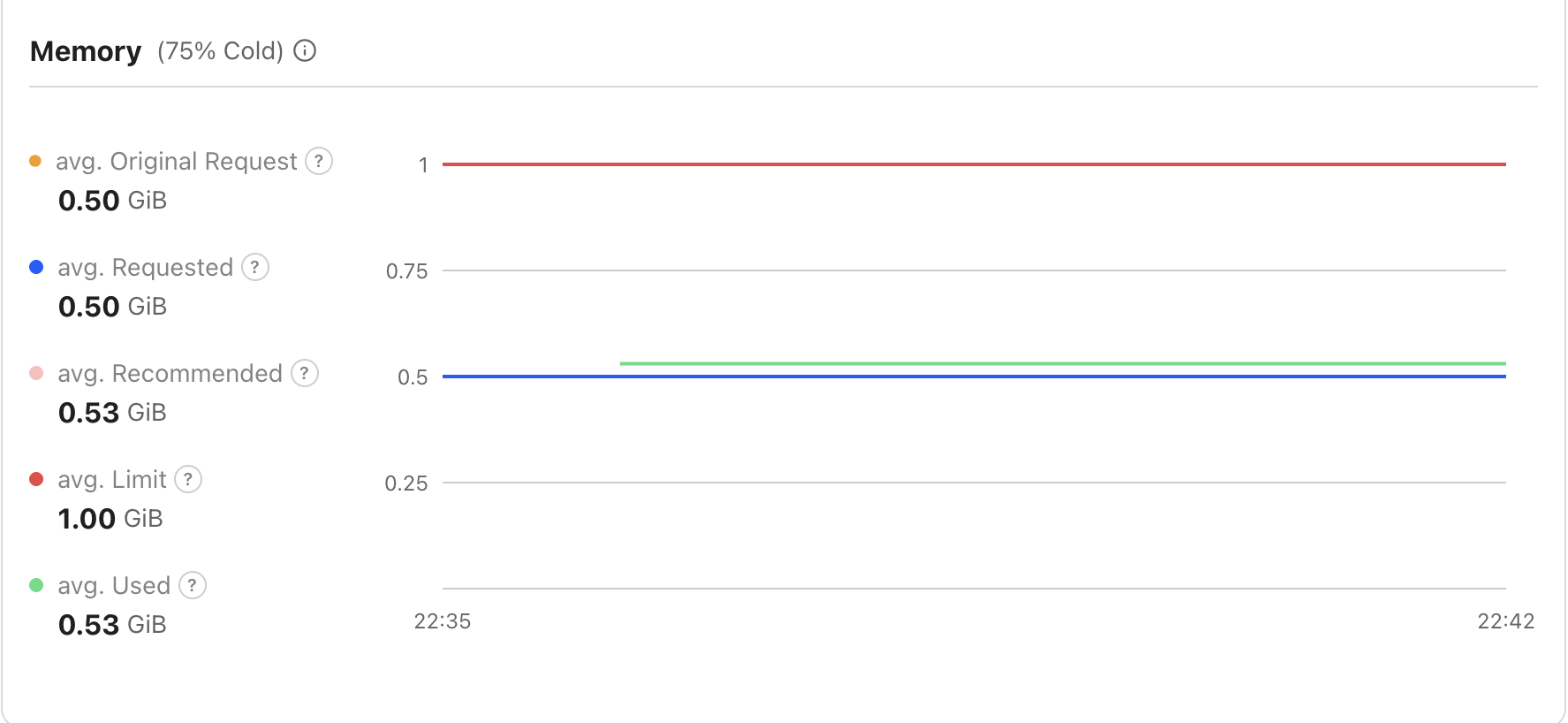
For the next test, we used an application that frequently accessed only about 20% of its data. During one baseline observation, the Console showed 75% Cold.
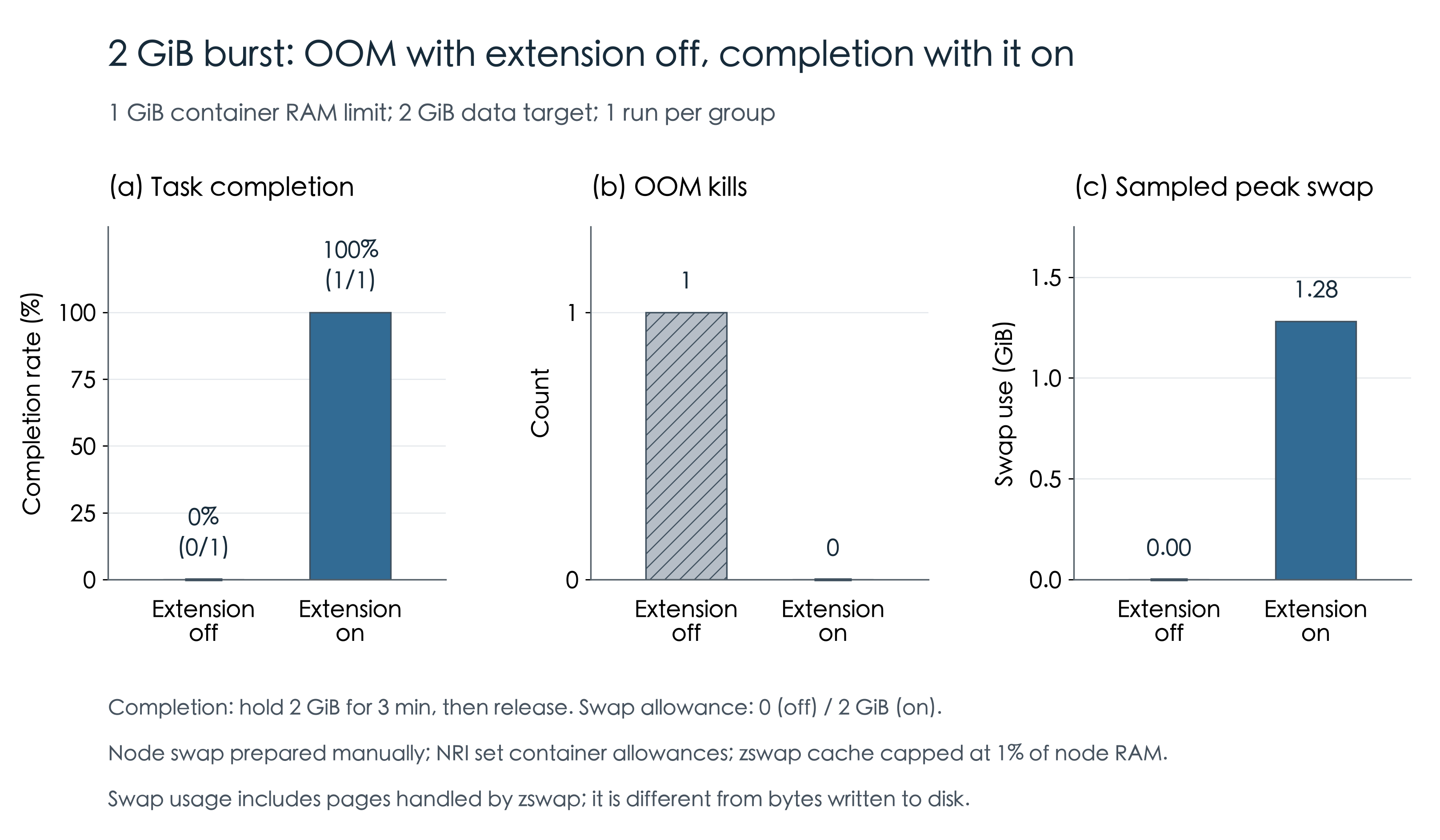
This time, the application attempted to grow from 512 MiB to 2 GiB of data. Both groups still had a 1 GiB RAM limit. The enabled group's swap allowance increased to 2 GiB, and the node's compressed cache was capped at 1% of RAM. The application filled the allocated memory with random bytes.
We ran each group once. The disabled group hit OOM. The enabled group used about 1.28 GiB of swap, held 2 GiB of data for three minutes, and released it, completing the test.
Memory Extension prevented OOM in this run, but requests were still affected. Over the 180 seconds from the start of the burst, the enabled group had 29 failed requests out of 3,600. P99 latency for successful requests rose from about 7.1 ms before the burst to about 1.07 seconds.
Frequent swap reads slow down requests
To compare the effect of access patterns, we tested two workloads with Memory Extension enabled. The cold-access group accessed only the first 20% of pages; the hot-access group accessed all pages. Both had a 1 GiB RAM limit and a 2 GiB swap allowance, and both attempted to hold 2 GiB of data.
Each group completed three runs without OOM. The chart below compares requests during the 120-second hold phase after the application reached 2 GiB.
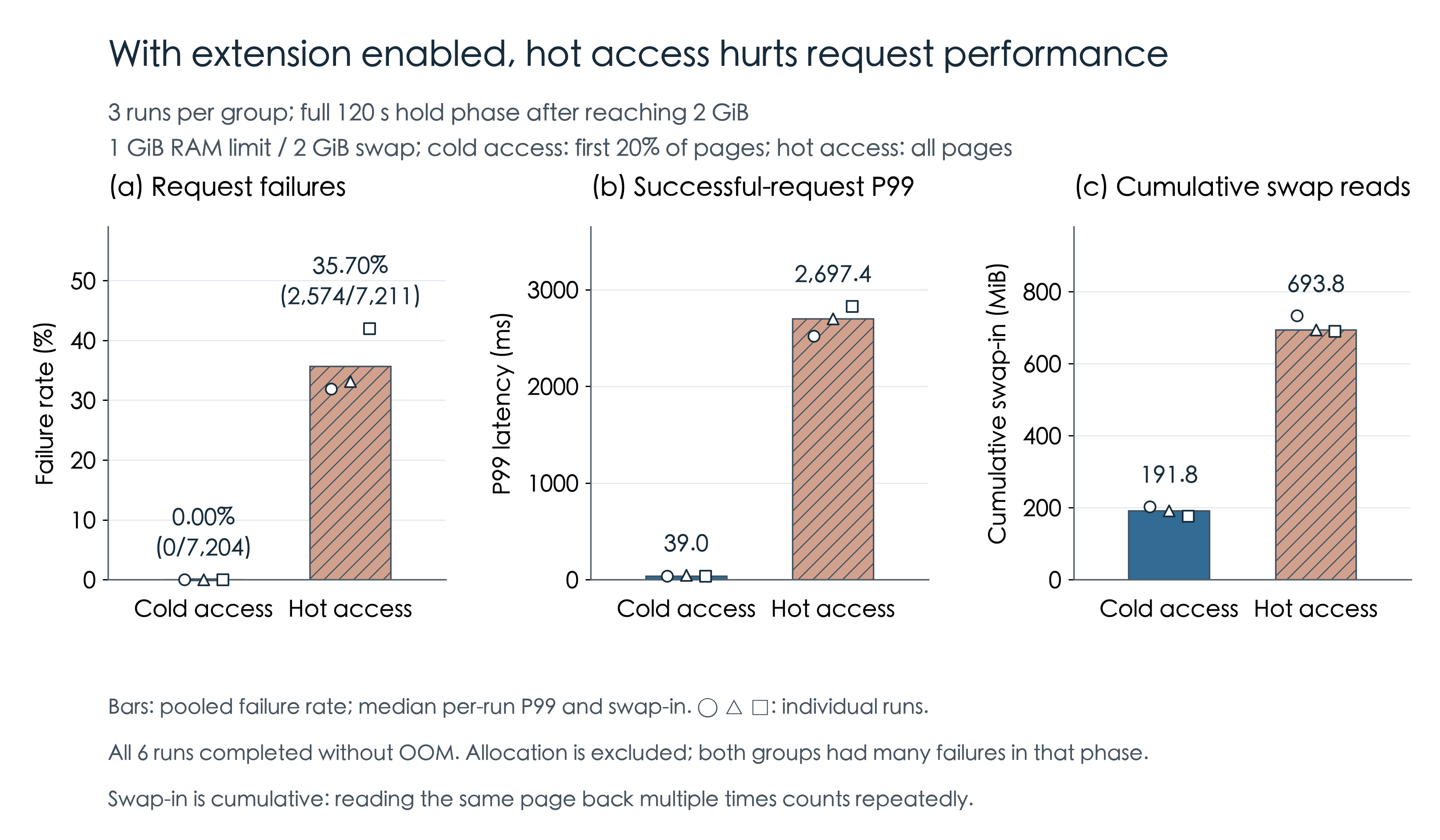
The cold-access group had no failed requests and a P99 latency of 39 ms among successful requests. The hot-access group had a 35.70% failure rate and a P99 latency of 2.70 seconds. Cumulative swap reads were about 192 MiB for the cold-access group and 694 MiB for the hot-access group.
The chart covers only the hold phase. During allocation, the two groups had request failure rates of 79.34% and 68.10%, respectively. The allocation code also competed with request handlers for a read-write lock, so these failures reflected both lock contention and memory reclaim.
Here, “cold” and “hot” describe the application's access range. Accessing 20% of pages does not mean the monitoring metric will show 80% Cold.
More pressure can still cause OOM
Keeping the 1 GiB RAM limit and 2 GiB swap allowance, we raised the cold-access workload's target from 2 GiB to 3.5 GiB. The container was OOM-killed even with Memory Extension enabled.
The compressed cache size also mattered. The same workload initially hit OOM at the 2 GiB target with the cache capped at 20% of node RAM. It completed only after we reduced that cap to 1%. The compressed cache itself consumes RAM, so its size needs to account for container limits and how well the data compresses.
Persistent capacity shortages, continuous growth, and memory leaks still require more physical memory, lower memory demand, or an application fix. For the broader resource-sizing context, see Kubernetes requests, limits, and rightsizing.
What CloudPilot AI adds to native Kubernetes swap
With native Kubernetes swap, operators prepare swap on each node and maintain the kubelet configuration. To use zswap as well, they configure its cache and capacity policy separately. In CloudPilot AI, NodeClass provisions new nodes with zswap and swap, calculates capacity, and checks disk space.
For eligible Burstable containers, native LimitedSwap bases the swap allowance on the container's memory request as a share of node RAM. A low request can therefore mean little swap headroom during a spike. In CloudPilot AI, you set a multiplier in NodePool. NRI calculates the allowance from the memory limit, or the request if no limit is set, without changing either value.
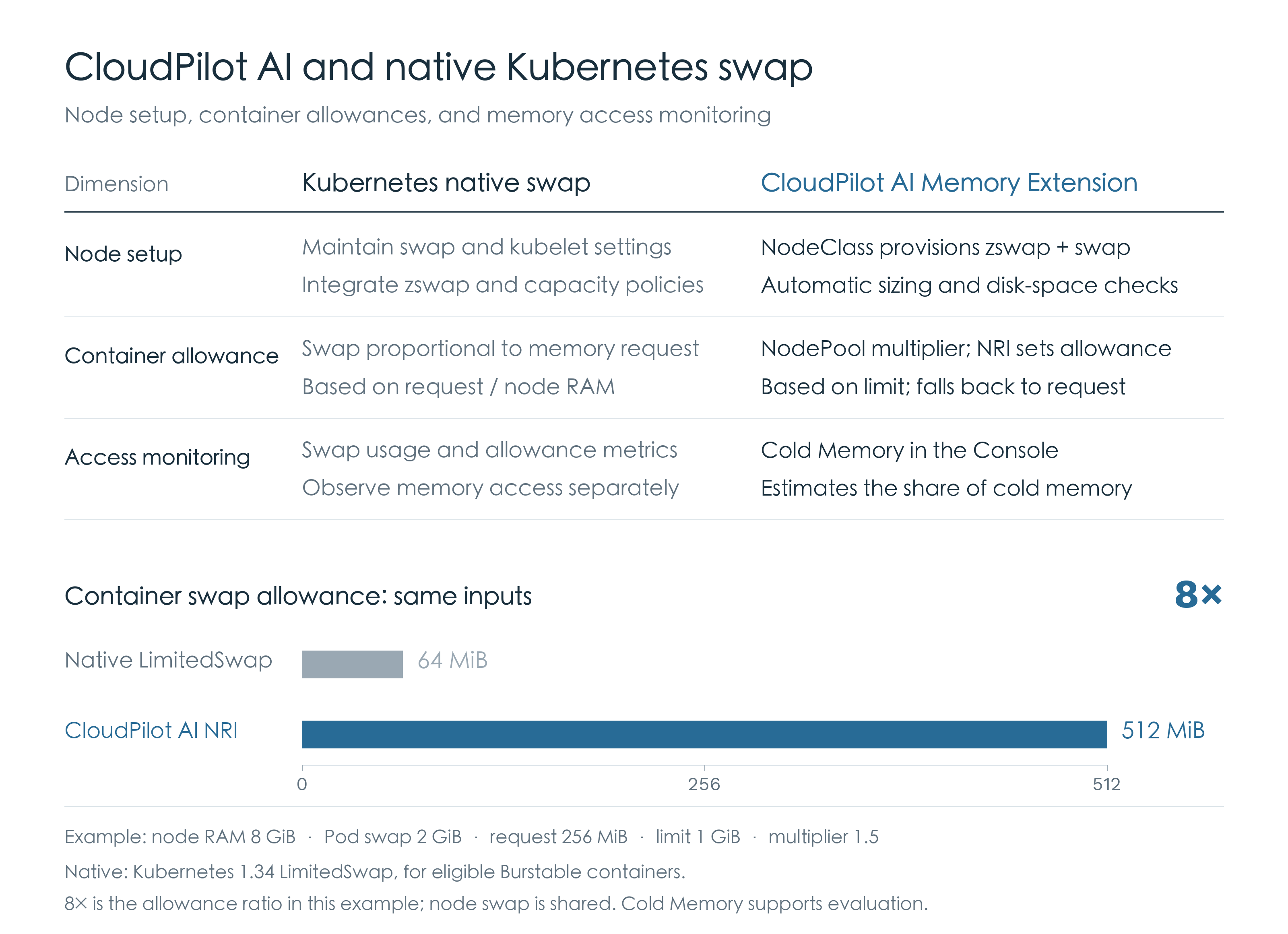
The example uses the same inputs for both approaches: 8 GiB of node RAM, 2 GiB of swap available to Pods, and a container with a 256 MiB request and a 1 GiB limit. Native LimitedSwap gives it 64 MiB; NRI with a 1.5 multiplier gives it 512 MiB, or 8 times the native allowance in this example. Actual usable capacity still depends on the node's shared swap pool.
CloudPilot AI also reports Cold Memory in the Console, giving operators an estimate of infrequently accessed memory when choosing workloads to test.
Enable it in the Console
Under memory pressure, Linux can compress some pages into zswap and, when necessary, write them to disk swap to free RAM. Accessing those pages again requires decompression or a read from disk.
CloudPilot AI has two configuration points: NodeClass prepares zswap and swap on the node, while NodePool uses NRI to set each container's swap allowance.
Memory Extension supports CloudPilot AI-managed AWS NodeClasses running Amazon Linux 2023 on nodes with at least 4 GiB of RAM. The NRI add-on additionally requires a compatible runtime, EKS 1.34 or later, and Linux amd64 nodes. See the Memory Extension requirements and capacity settings and NodePool add-on reference before enabling it.
First, go to Node Autoscaler → Node Class → Metadata & add-ons and enable Memory Extension. We kept the default capacity settings for this test; new nodes received about 2 GiB of shared swap.
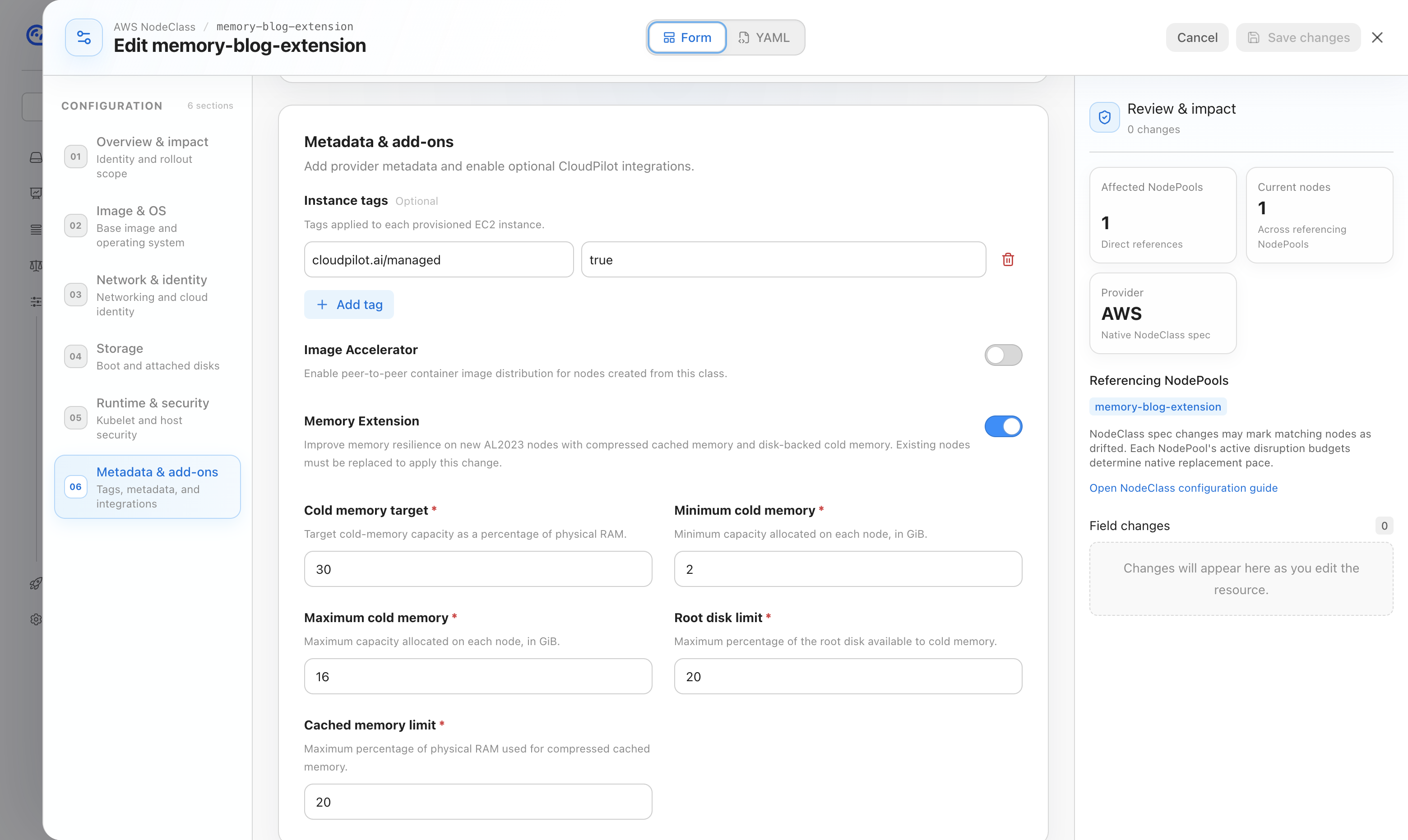
Then open the target Node Pool → Add-ons, enable Auto memory extension (NRI), and set Memory multiplier to 1.5.
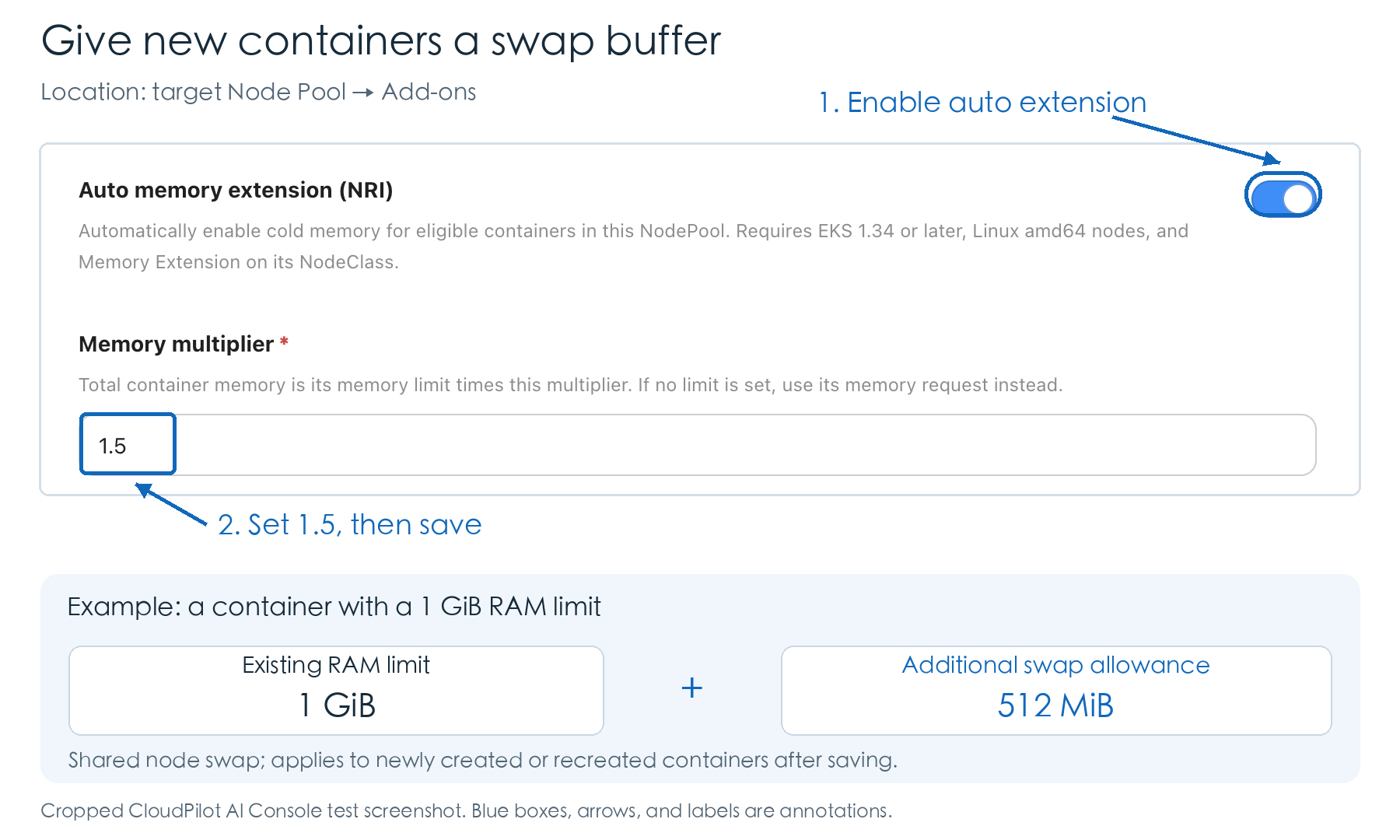
For a container with a 1 GiB RAM limit, a 1.5 multiplier allows up to 512 MiB of additional swap. Its existing request and limit stay unchanged. Containers share the node's swap pool; an allowance does not reserve capacity.
NodeClass settings apply to new nodes. Once the NRI policy has synchronized, allowances apply to newly created or recreated containers. Check that the NRI components are ready before creating a test Pod.
Test setup and measurement
The tests used EKS 1.34, AL2023, cgroup v2, and containerd with NRI support. The 1,152 MiB comparison used two identically configured m6i.large nodes, each with 8 GiB RAM, and a container memory request of 256 MiB. The later 2 GiB test and the cold/hot comparison each used separate m6i.xlarge nodes with 16 GiB RAM. For those tests, we manually prepared about 3 GiB of node swap and used NRI to set container allowances.
For the latter two experiments, we manually set /sys/module/zswap/parameters/max_pool_percent to 1 on the test nodes. Reported swap usage includes pages handled by zswap and is different from bytes written to disk.
All groups received 20 requests per second. In the 1,152 MiB comparison and the single-run 2 GiB comparison, each request read 32 randomly selected pages. The cold/hot comparison read 128 pages per request and continuously wrote pages in the background. Its failure rates pool request counts across three runs; P99 and swap-in volume are medians of the per-run values. Reading the same page back multiple times counts repeatedly toward swap-in volume.
The 75% Cold screenshot comes from the baseline before the compressed cache was adjusted and reflects sampling over the most recent complete five-minute window. In the cold/hot comparison, Cold readings changed from about 43% / 0% to about 1% / 0% after the containers were recreated. The cause remains unconfirmed, so those groups are defined by the application's access range.
Conclusion
With Memory Extension enabled, the application completed the 1,152 MiB and 2 GiB tests that ended in OOM with the feature disabled. Raising the target to 3.5 GiB still caused OOM, and the hot-access workload had higher latency and more failed requests as it read more data back from swap.
Related articles
CPU Usage Looks Low. Why Is Your Application Still Slow?
CPU usage shows consumption, not waiting. Learn how CloudPilot AI Workload Autoscaler combines usage, PSI, and resource policies to right-size workloads.
CloudPilot AIOct 30, 20267 min
Up to 45% Less Memory, Zero Compromise: Smart Java Workload Optimization on Kubernetes
Learn how CloudPilot AI jointly optimizes JVM Heap and Kubernetes container resources to cut Java workload memory by 40–45%—without sacrificing stability or requiring manual tuning.
CloudPilot AIMar 20, 20268 min
Kubernetes Capacity Planning Playbook: How to Balance Performance, Stability, and Cost
Learn how to plan, optimize, and automate Kubernetes capacity. This playbook covers best practices to balance performance, stability, and cloud cost.
CloudPilot AIOct 16, 20259 minThe Kubernetes Autoscaling Brief
Once a month: what we see in the Spot market, one real cluster torn down, and what shipped.
No spam. Unsubscribe anytime.