
AWS Fargate vs EC2 for EKS: Which Is Cheaper?
 CloudPilot AIEngineering TeamPublishedNov 9, 2026Read9 min
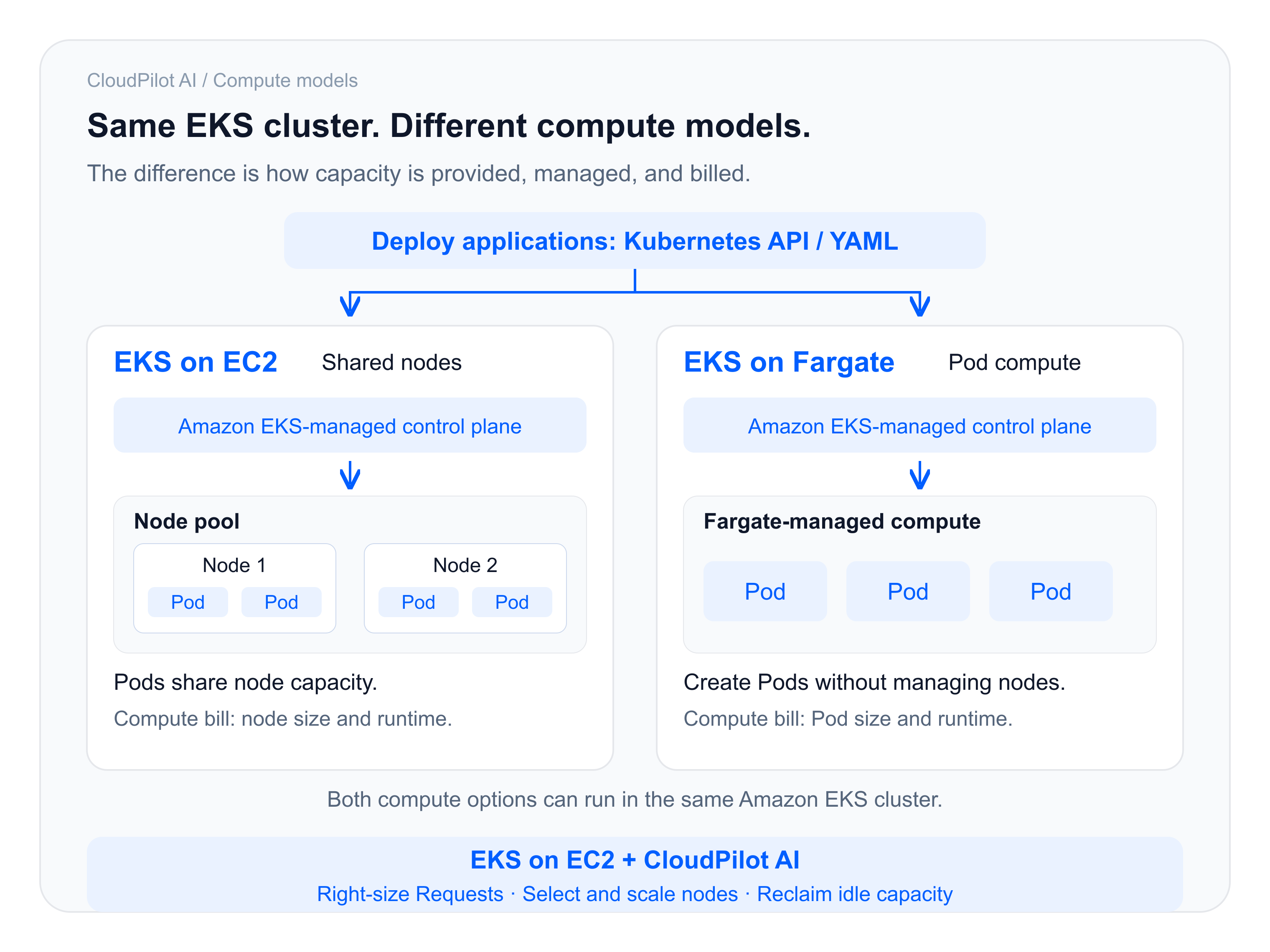
Many teams choose AWS Fargate for Amazon EKS to spend less time selecting nodes, scaling capacity, and maintaining infrastructure. Applications still deploy through Kubernetes, while AWS manages the underlying compute. EKS can run Pods on either Fargate or EC2; this article compares those two compute options.
But when services stay online and their day-to-day usage is well below peak demand, another question comes up: if the applications are quiet most of the time, why isn't the compute bill falling?
Moving to EC2 nodes on EKS raises a different concern: will the compute savings turn into more operational work for engineers? For these teams, the useful comparison is whether they can keep their application deployment process, organize compute more efficiently with EC2 nodes, and let CloudPilot AI continuously manage resource sizing and node capacity.
Why doesn't a quieter application mean a smaller bill?
Suppose you run a group of services that must remain online. To handle promotions, events, or brief traffic spikes, the team configures each Pod with substantial CPU and memory capacity. After the peak, the services keep running, but resource usage is much lower than the configured size.
On Fargate, that gap does not automatically reduce the bill. According to the AWS Fargate pricing rules and EKS Fargate Pod configuration guide, compute charges depend on the Pod's provisioned vCPU and memory and its billable duration. EKS Fargate requires CPU and memory requests to equal limits for every container. It selects a supported compute size from the Pod's requests, including additional memory for Kubernetes components. Billing is not based on the actual usage shown in a monitoring dashboard.
Fargate removes the need to manage the underlying nodes, but application sizing still matters. Lowering specifications, reducing replicas, or stopping Pods that are no longer needed can reduce charges. A drop in CPU usage alone usually will not reduce the bill if the provisioned specifications and runtime remain unchanged.
EKS on EC2 works differently. Multiple Pods can share each EC2 node's capacity. Instance specifications, count, and runtime determine node compute charges. This gives the team more room to reorganize resources, but it also brings node management responsibilities.
Why can the same "2 vCPU, 4 GiB" label mean different costs?
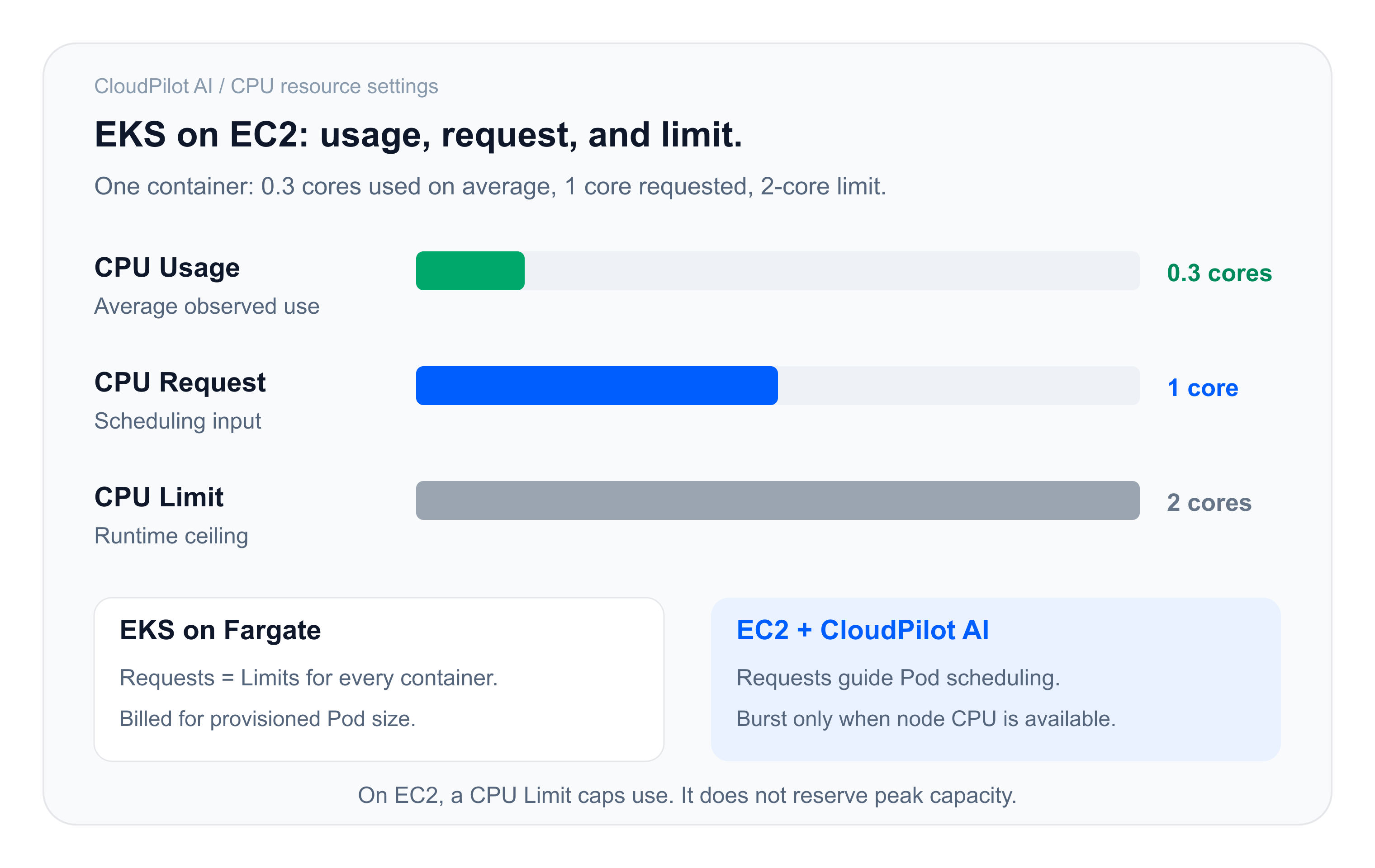
Start with a CPU example: a container uses an average of 0.3 cores. On Fargate, the team configures a CPU request and limit of 2 cores to allow for peak demand. Average usage of 0.3 cores does not make the CPU charge fall to the price of 0.3 cores.
On EC2 nodes, the team can set a CPU request of 1 core and a CPU limit of 2 cores. Requests are used for scheduling and resource allocation; a limit is the container's usage ceiling. When the node has spare CPU, a container can use more than its request, up to its limit. Multiple services can therefore share available capacity instead of each requiring dedicated node capacity sized for its peak, provided scheduling and performance requirements are met.
The important question is whether the services have capacity they can share. If all services peak at once, or latency, isolation, and redundancy requirements demand dedicated headroom, that capacity still needs to be available. Memory also needs separate treatment: application working sets, OOM risk, and runtime behavior cannot be handled by simply applying the CPU-sharing model.
Identical labels such as "2 vCPU, 4 GiB" do not establish identical performance or a fixed price difference. The comparison that matters is the cost of processing the same amount of work while meeting the same service objectives. For more on the scheduling model, see Kubernetes resource requests.
A worked example: about USD 388,714 in annualized gross compute savings
Consider an illustrative enterprise data-processing platform that runs data cleaning, report generation, and offline analysis each day. It has 100 task groups, each with 20 workers: 2,000 Pods in total. They run for 8 hours a day, or 240 hours in a 30-day month.
Both alternatives release compute after the jobs finish. On EKS with EC2 nodes, CloudPilot AI Node Autoscaler manages the application nodes and scales that node pool to zero after the work ends. During the running hours, resource sizing and shared node capacity reduce the compute bill.
The calculation below uses US East (N. Virginia), Linux x86 On-Demand rates checked on November 9, 2026. It is a worked example, not a measured customer result. The difference is gross compute savings, before CloudPilot AI fees, EC2 storage, other infrastructure, or migration costs. The EKS control-plane fee is common to both options and is outside this compute comparison.
Fargate: pay for the provisioned size of 2,000 Pods
Each Pod has CPU requests and limits of 2 vCPU and memory requests and limits of 4 GiB. EKS Fargate adds 256 MB of memory for Kubernetes components, then rounds up to a supported configuration. In this example, each Pod receives a billable configuration of 2 vCPU and 5 GiB: 4,000 vCPU and 10,000 GiB in total. AWS defines GB as 1,024³ bytes on its Fargate pricing page; GiB is used here consistently with the Kubernetes resource settings.
The example uses Fargate Linux x86 rates of USD 0.04048 per vCPU-hour and USD 0.004445 per GiB-hour. Fargate bills from image download until Pod termination, per second with a one-minute minimum for Linux. The model uses 240 billable hours for each Pod and EC2 node.
The monthly compute charge is:
(4,000 × 0.04048 + 10,000 × 0.004445) × 240
= USD 49,528.80 per month
EKS + CloudPilot AI: share node capacity and scale idle capacity to zero
Set each Pod's requests to 0.5 vCPU and 1 GiB while retaining the original limits. The combined requests of 2,000 Pods are 1,000 vCPU and 2,000 GiB.
The example uses 100 c7i.4xlarge EC2 nodes, each with 16 vCPU and 32 GiB. Reserving 1 vCPU and 2 GiB per node for the system and components leaves 1,500 vCPU and 3,000 GiB for Pods across the node pool, providing headroom above the combined requests.
At an EC2 Linux On-Demand rate of USD 0.714 per node-hour, with every node running for 240 hours per month:
100 × 0.714 × 240 = USD 17,136.00 per month
| Monthly compute comparison | EKS on Fargate | EKS on EC2 + CloudPilot AI |
|---|---|---|
| Billable resources | 4,000 vCPU / 10,000 GiB | 100 EC2 c7i.4xlarge nodes |
| Runtime | 240 hours per Pod | 240 hours per node |
| Monthly compute charge | USD 49,528.80 | USD 17,136.00 |
| Monthly gross compute savings | USD 32,392.80, or about 65.4% |
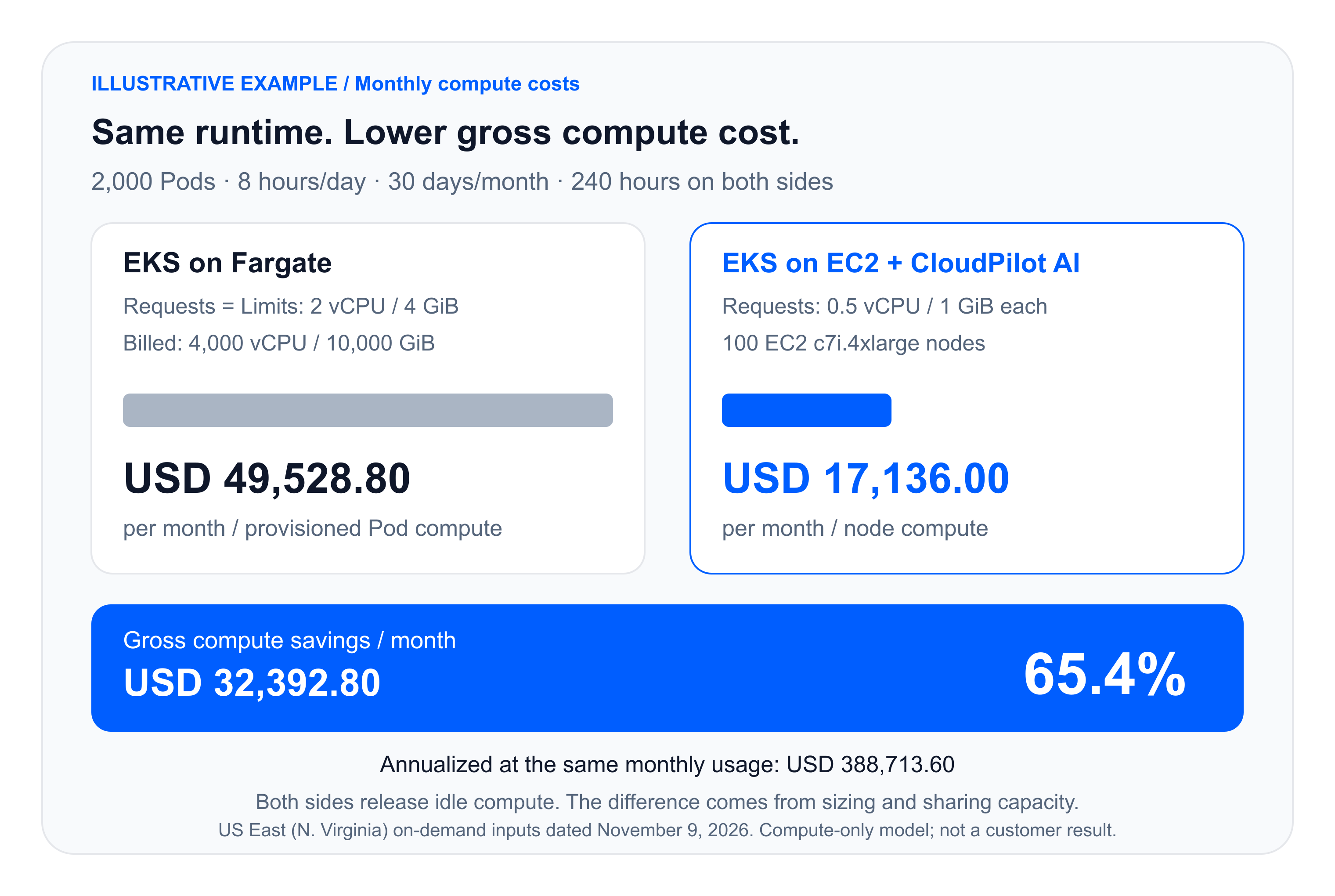
With on-demand start and stop on both sides, monthly compute charges fall from about USD 49,500 to USD 17,100 in this example. Applying the same monthly model for 12 months gives USD 388,713.60 in annualized gross compute savings.
The lower node capacity does not cover every Pod reaching its limit simultaneously. That makes representative peak-load and memory tests part of validating this configuration, not an optional step after calculating savings.
See the NodePool configuration guide for node selection and pool policies, and NodePool Disruption Budgets for controls on voluntary node changes.
Lower costs still need to meet service requirements
A migration assessment needs more than an optimized cost screenshot. For the team running the services, three questions matter:
- What happens when peak traffic arrives? Test throughput, latency, and scale-out time with representative peak traffic. Check quotas, available capacity, and application startup time. A CPU limit is not a promise of immediately available capacity.
- Will node consolidation affect the application? Validate node changes and rollback against replica counts, PodDisruptionBudgets, storage, and scheduling constraints. Single-replica and stateful services need their own plan.
- Who owns which work? EKS manages the control plane, while CloudPilot AI automates application-resource and EC2 node-capacity management. The team still owns applications, deployment processes, and availability objectives. Security, networking, and other responsibilities also need to be agreed before onboarding.
Start with a clearly scoped group of services that can be rolled back. Confirm that performance and reliability meet the requirements, then compare the full costs. That gives the team a sound basis for extending the approach to more services.
Which teams should evaluate it?
EKS on EC2 + CloudPilot AI is worth comparing when services run for long periods, actual usage is well below the configured size, service peaks do not completely overlap, and the team cannot spend time continuously tuning resources by hand.
If jobs are brief, the overall environment is small, or Fargate already meets the team's scaling and maintenance needs, a generic savings percentage is not a reason to migrate. Compare actual bills and service objectives first, and check whether savings cover additional fees and migration work.
For teams already using EC2 nodes on EKS, the starting point is the current node bill: examine the gap between requests, actual usage, and paid capacity. There is no need to use Fargate as the baseline. CloudPilot AI Workload Autoscaler continuously adjusts application resource requests; coordinating those changes with node consolidation is what turns released scheduling capacity into a smaller node bill.
Book a CloudPilot AI demo to compare resource settings, node capacity, and full costs for a group of your own services, and decide whether a different approach is worthwhile.
Related articles
Memory Extension in Practice: Reducing OOM Risk During Memory Spikes
EKS tests show how CloudPilot AI Memory Extension can absorb memory spikes, when swap increases request latency, and how to configure NodeClass and NodePool.
CloudPilot AINov 4, 202610 min
CPU Usage Looks Low. Why Is Your Application Still Slow?
CPU usage shows consumption, not waiting. Learn how CloudPilot AI Workload Autoscaler combines usage, PSI, and resource policies to right-size workloads.
CloudPilot AIOct 30, 20267 min
Up to 45% Less Memory, Zero Compromise: Smart Java Workload Optimization on Kubernetes
Learn how CloudPilot AI jointly optimizes JVM Heap and Kubernetes container resources to cut Java workload memory by 40–45%—without sacrificing stability or requiring manual tuning.
CloudPilot AIMar 20, 20268 minThe Kubernetes Autoscaling Brief
Once a month: what we see in the Spot market, one real cluster torn down, and what shipped.
No spam. Unsubscribe anytime.